We remain fully operational. Our teams are working around the clock to ensure your deliveries continue safely.

DOWNLOAD THE APP


Customer Services
Copyright © 2025 Desertcart Holdings Limited
DOWNLOAD THE APP
Buy anything from 5,000+ international stores. One checkout price. No surprise fees. Join 2M+ shoppers on Desertcart.
Desertcart purchases this item on your behalf and handles shipping, customs, and support to Mexico.
⚡ Future-proof your desk with power, speed, and style.
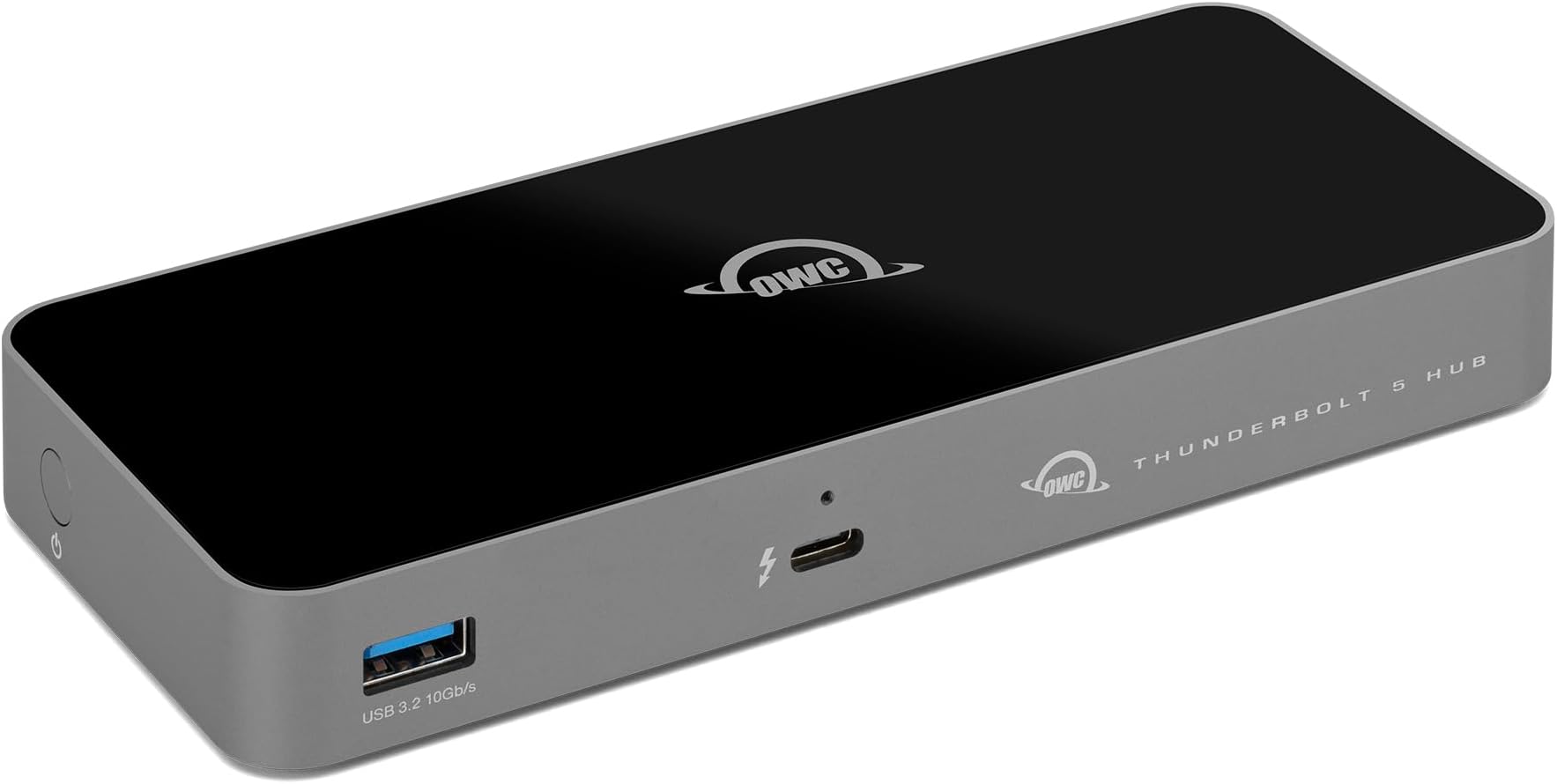
The OWC Thunderbolt 5 Hub is a premium 5-port expansion device compatible with Thunderbolt 3, 4, 5, USB4, and USB-C systems. It delivers blazing 80Gb/s data speeds, supports triple 8K displays, and provides up to 140W charging power—all in a fanless, silent aluminum enclosure designed for professional-grade productivity and seamless multi-device connectivity.


| ASIN | B0DPKL911T |
| Additional Features | Bandwidth Boost for Video Intensive Usage |
| Best Sellers Rank | #127 in USB Hubs |
| Brand | OWC |
| Color | Black/Space Gray |
| Compatible Devices | Thunderbolt 5, Thunderbolt 4, Thunderbolt 3, USB4 and USB-C compatibile: Macs, iPads, PCs, Chromebooks, Android tablets, and Surface devices Compatible Devices Thunderbolt 5, Thunderbolt 4, Thunderbolt 3, USB4 and USB-C compatibile: Macs, iPads, PCs, Chromebooks, Android tablets, and Surface devices See more |
| Customer Reviews | 3.7 out of 5 stars 146 Reviews |
| Data Transfer Rate | 120 Gigabits Per Second |
| Enclosure Material | Aluminum |
| Hardware Interface | Thunderbolt |
| Item Dimensions L x W x H | 7"L x 3.1"W x 0.9"H |
| Item Weight | 382 Grams |
| Manufacturer | Other World Computing |
| Mfr Part Number | OWCTB5HUB5P |
| Minimum Required Operating System Version | Mac OS 14 Sonoma, Windows 10 |
| Model Number | OWCTB5HUB5P |
| Number of Ports | 4 |
| Operating System | macOS, Windows |
| Special Feature | Bandwidth Boost for Video Intensive Usage |
| Total USB Ports | 4 |
| Total Usb Ports | 4 |
| UPC | 810159628211 |
| Warranty Description | No Warranty |
M**L
Perfect. Powered USB-C. Works amazing in my podcast studio.
This is awesome! I have two of them and they make it possible to connect all of my peripheral devices that are USB or USB-C, and need power. I use it for my Elgato decks, and my Sony camera. No power issues at all.
M**.
Solid on all points.. love it!
Works perfectly and a fair price, especially happy it can ramp up the power on its USB-A port in order to charge iPads and especially my superdrive, without connecting directly to my MacBook Pro M3 pro. I opted for this thunderbolt 5 hub, even though my MacBook is thunderbolt 4, to future proof myself. Thus, I can't really say I'd buy it again, because I won't need to, so instead I will say I highly recommend it. One caveat is, it's not exactly plug and play right out of the box, so I had to open up the MacBook and give the device permission to be used so that My BenQ monitor would fire up and the driver install to enable superdrive support is a little odd, because you have to roll back the software and driver to an older version for it to work, had to hunt around to find this little tidbit out. I won't hold that hiccup against it, because it is solidly build, silent, warm but not hot, and does everything OWC says it does. I can't really ask for more than that... What I'd like to see is updated software that includes superdrive & iPad/iPhone fast charging working or at least clear messaging about the software roll-back until they get it working in the latest software version.
C**E
premium price, joke quality
Loose-fitting ports, trash cables, flakey display management. I bought 2 of these hubs, both had super-flakey connections. Lightly brushing cords is enough to cause monitors to lose sync and reset. I replaced the cables and reduced the problems significantly, but could still cause nonrecovering resets by wiggling the new cables. When I put the OWC cables into other hubs I could make them lose connection by wiggling them, also. I can connect one monitor through it at 4K@60, but 2 at that rate cause screen glitches on one and resets on the other. I repeated this behavior connected to all my machines, Mac and Windows, TB4 and TB5. Another different flakey display problem is that, specifically on the Mac Studio M3 ultra, it seems the Mac can send polling or control traffic to this thing fast enough to glitch it out. This can be triggered by opening Display Settings. If that panel is open off-screen it will result in infrequent resets. If it's onscreen then the resets become markedly more frequent. Close that panel and the resets stop. I suspect it's the result of not keeping up with the Mac's display controller because the problem is MUCH worse when you connect an active cable, introducing slight delays in the signal. NOTE: For the tests and FYI: - all tests were computer --> hub --> 8K USB-C-to-DP adapter --> 8K cable --> monitor - Monitors were: LG (glitchy) and Samsung (resets) - all cables were short, passive, certified TB5 cables - Machines were: -- lenovo legion 5i (intel TB4) -- Mac Studio (M3 ultra) -- Macbook Pro (M4 pro) Yes, I used only short passive Thunderbolt 5 cables in all tests, and all tests were connected directly from
M**N
Good TB5/USB4.2 hub from great company. Windows function not as versatile as Mac due to PC design
This USB4.2/TB5/4/3 hub works well and supports all protocols from USB 4.2/Thunderbolt 5 back to USB 2/1.1 — I tested all of this. Note that you will need different cables and/or adapters to support Thunderbolt 2/1 and USB 3.0/2.0/1.1 on a Mac. Windows PC compatibility beyond TB5/4 and USB 4.2 is not promised nor can I test it. Anyway, this lets you add two USB 4.2 ports over USB-C (one pair of ports contains the uplink and replaces that port on your computer) plus a USB-A port for USB 3.0/2.0/1.1 only. Has enough bus power to charge nearly anything quickly. Why give it only 4 stars? It's design is nearly the same as the TB4 hub it replaces but some of the ports are in different locations on the unit. The old version had a logo that lit up different colors to let you know if your uplink is working and you are correctly connected—this one has an LED under the unit to let you know the status of your connection and that is not as good. Build quality is up to OWC's high standard. For the price, I hoped for more ports and an LED on the top. It's also nearly twice as large as the old version, no doubt to accommodate the larger charging capacity and new internal fan. Overall value is hard to say. USB 4.2/TB5 is twice as fast as the older TB4/USB 4 version. Good company and has a 2 year warranty. If your Mac/PC does not have TB5, this will not add it but if it does, you want one of these.
J**A
Powerful and Super Convenient!
The OWC Thunderbolt 5 Hub is a game-changer for my workstation. The three Thunderbolt 5 ports are blazing fast, and the USB-A port adds extra versatility for older devices. I’m able to connect multiple high-speed drives and monitors with no lag or connectivity issues. The hub feels solid and well-built, and it keeps my setup clean and organized. Absolutely worth it if you need reliable, high-speed expansion for your Thunderbolt devices!
S**P
Met my needs!
My requirement was to reliably connect my mac book m3 with 2 monitors and bunch of accessories, and it worked. Quality of the build is good, and feels it will last
D**.
Macbook pro capability...not really.
Used with a 2025 Macbook pro. Experienced external monitor black outs. Would also get messages regarding external drives not being ejected after the hub reboots. After 4 months replaced with the Satechi Thunderbolt 4 dock. Have not experienced any issues with the Satechi.
C**S
You can never have enough Thunderbolt ports
So far I am very happy. If your like me and you have several Thunderbolt drives for instruments and samples then you will be happy. I can imagine anyone who works with video or music this is a must have.
Trustpilot
2 weeks ago
2 weeks ago