⚡ Power up your play—never pause, always dominate!
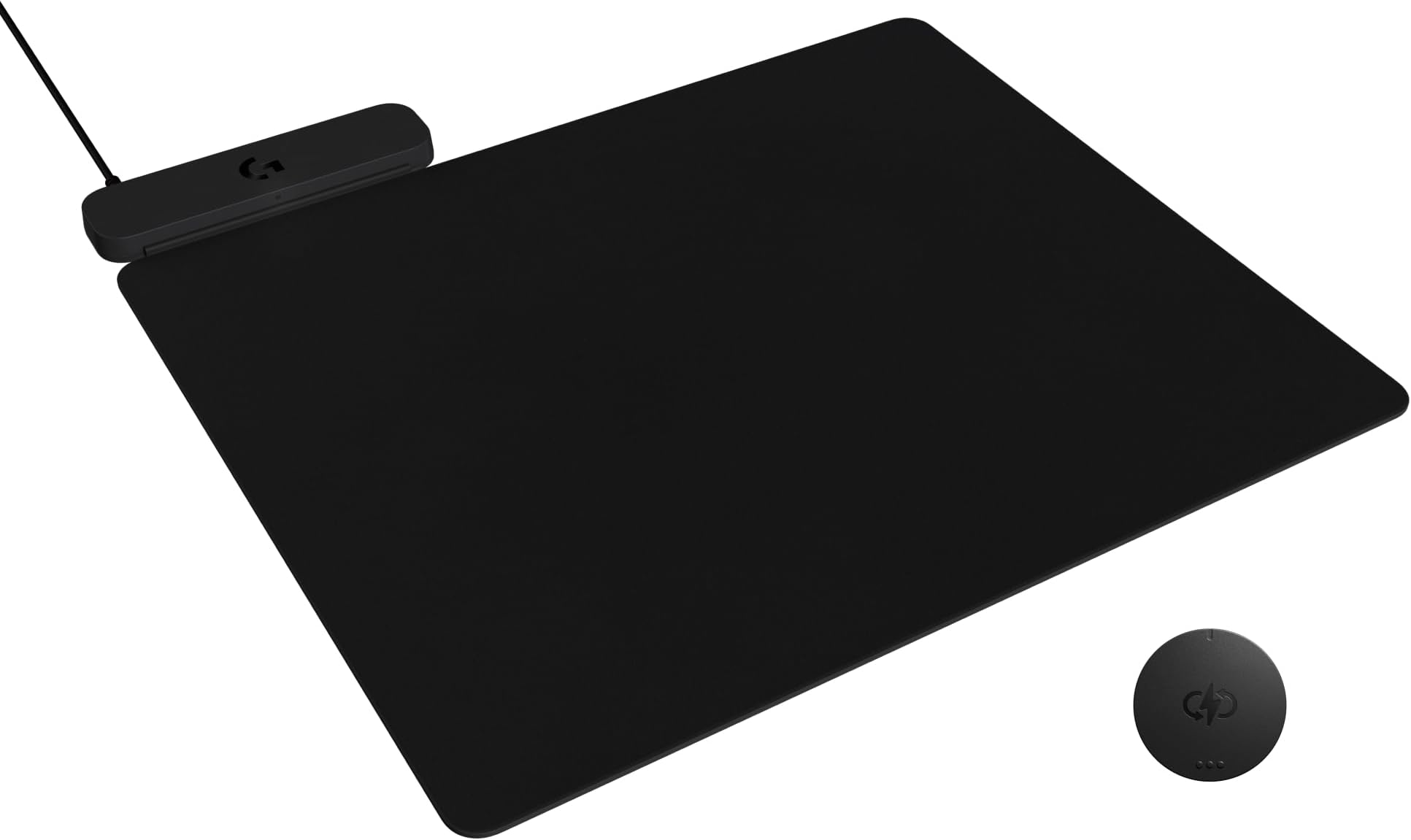
The Logitech G POWERPLAY 2 is a cutting-edge wireless charging mouse pad designed for serious gamers. Measuring 34.5 x 28.4 cm with a slim 3.5mm profile, it continuously charges compatible Logitech G wireless mice during use and rest, eliminating battery downtime. Compatible with over 10 Logitech G models including LIGHTSPEED 4KHz tech, it connects via USB-A and supports both PC and Mac platforms. Its sleek design balances performance and comfort, making it an essential upgrade for wireless gaming enthusiasts seeking uninterrupted, future-ready power.


| ASIN | B0DMCZKQCW |
| Best Sellers Rank | #19,801 in Office Products ( See Top 100 in Office Products ) #314 in Mouse Pads |
| Brand | Logitech G |
| Color | Black |
| Customer Reviews | 3.7 3.7 out of 5 stars (177) |
| Date First Available | February 25, 2025 |
| Item Dimensions LxWxH | 13.5 x 11.2 x 0.1 inches |
| Item Weight | 1.78 pounds |
| Item model number | 947-000001 |
| Manufacturer | Logitech |
| Product Dimensions | 13.5 x 11.2 x 0.1 inches |
A**X
Read for a TL;DR
Good product, I recommend it Here's what you want to know: No, you cannot pair your mouse and keyboard to it. I have heard this was a feature in the Powerplay 1, but it is not included with this product. If you plug it into a 'USB switch' or a 'USB splitter', and you hear a pulsing rhythmic beeping sound, it does not have enough power to function. Plug into a dedicated port or get a powered USB splitter. No, it cannot charge your phone. The mouse pad material is removable from the top of the charging pad. This means you can put another similar sized mouse pad on it, or put it under your existing desk mat. It does not start charging your mouse until at least 80%, and it stops at 90%. This is a feature to extend battery longevity, not a defect. It does not charge a fully dead mouse. If Its fully dead, plug it in to the USB C. No, It does not appear in G Hub as a device. Cheers.
S**L
Logitech should have thought this through much better than this! Read this before you purchase.
This whole powerplay 2 thing has been super annoying, I bought one and returned it because I thought it wasn't working. First nothing tells you now with the mice you HAVE to use the dongle, so of course I was confused why my mouse wasn't just working when turned on. The old powerplay doesn't recognize the new wireless mouse, so it wouldn't show up on that one either. Then the other issue is the powerplay2 mat itself doesn't show up in GHUB, that is a huge change for logitech and they don't tell you to expect that. So I assumed my first powerplay2 mat was DOA, because when you plug it in, there was no indication in windows anything connected, my first one, I don't think I heard the usb sound when you connected it, but I did notice on the second one a tiny light, so at least I know it is getting power. But still doesn't show up on ghub, so how would you know without them being specific about: 1) The new powerplay 2 doesnt' have a receiver in it., you HAVE to use the new dongles with your devices (this is how they say it has future compatibility). 2) It won't show up in ghub, so don't look for it. 3) The new devices also won't be detected with the original powerplay built in receiver. 4) The new powerplay 2 only has a tiny light in the front side of it, to show it has power I am not sure if the logo will light up like the old one did when it is charging the mouse or not, but kind of hard to tell if it is working. So those are huge changes, hopefully people get that without returning it like I did.
D**M
Excellent lightspeed wireless charging mouse pad!
-Excellent wireless charging mouse pad -It's compatible with most Logitech lightspeed wireless mouse, as long as you inserted the Powerplay coin which is included out of the box -cloth mouse pad itself is slightly thinner than its predecessor -However, it doesn't come with built-in receiver, nor it doesn't come with RGB lighting which you will need to use your own lightspeed USB dongle receiver in order to take of wireless capability, regardless the mouse you're using. -Other than that, it's working perfectly, easy to setup, and had no issue with battery life and input lag!
C**P
Nice
Havnt charged my mouse in months. Just wish they sold back up mouse pads for it. The mousepad freys a tiny bit after a few months.
D**K
Solid mousepad with wireless charging solution for your logitech mouse.
Hi amazon peeps! Lets talk about the power play 2 real quick. I have owned the original for a few years and now this one for a couple days and its pretty clear to see some of the pro's and cons of this charging mat. Here are my thoughts below: Cons: Lets start with the biggest con: I have a full metal desk in the Secret Labs Magnus Pro. On the Logitech website in the FAQ's it does clearly state that this pad will NOT work on full metal desks such as mine. This is completely true. My desk comes with the rubber pad on top of the desk and when you sit the powerplay on top of that pad it will not work at all, does not show the charging light even for a split second. HOWEVER, you can use other work arounds to get past this. As an example, I have the full glass razer mousepad I have flipped over glass side down, and another longer traditional mouse pad below that. All of this I assume is because of metal blocking/disrupting the charging signal sent to the pad so I put as much rubber and materials in between my desk and the pad to block that blockage lol? I digress, then on top of the glass mouse pad I have the powerplay 2. It stays connected about 90% of the time. It will still disconnect but its very in frequent and will work and get the job done. Is this annoying to do, yes, but if the goal is to NOT have to worry about your mouse dying then I am fine with dealing with this minor annoyance. Con# 2 (kinda): Yes, the mouse no longer connects directly to the mouse pad which means potentially, you will need to use 2 USB ports to use this combo as opposed to one. However some might see this as a benefit as well because you now don't have to have the mousepad powered by the computer. You can use a standard charging brick and plug it into the wall or if you have a USB hub built into a desk or a standalone, you can just plug it into that and still power the pad. Con# 3: Yes the mouse pad only comes with a standard cloth pad. My unit came with the cloth pad already attached to the mat itself ready to go. It would have been awesome to have the other hard pad in the box but it is what it is. Con# 4: This is just a personal preference, but I wish the mouse pad was a little bigger. Compared to other premium mouse pads, this one is about 2/3 the size of them but I find myself having to adjust the pad to find that comfortable spot where I don't slide the mouse off the pad while gaming, or hit the top of the charging interface on the top left of the pad. Pro's Pro# 1: Mouse battery never dies. I mean that's the whole reason you buy this setup right? Mission accomplished. Pro# 2: Easy setup, takes 2 steps, plug it in, and insert powerplay coin into mouse and you are good to go. Overall Thoughts: The powerplay 2 is a great system when used in the optimal conditions (non-metal desk users). It does exactly what you want it to do by keeping your logitech mice fully charged all the time. The software is easy to use and works 90% of the time...unlike razer synapse. If you can get past my personal con's listed above or those don't bother you, you will be in great shape and I would fully recommend this mat with a logitech mouse. Obviously, this only charges Logitech mice when used in conjunction with the powercoin that comes with the mouse pad and wouldn't necessarily recommend this pad with a non-logitech mouse.
J**H
Overpriced. But i still love it.
I got this to go with my Logitech G502X lightspeed wireless mouse. $120 for a mousepad is absolutely absurd and without a doubt a LUXURY to own. That being said, I love this mousepad, its so convenient to be able to have a wireless gaming mouse with infinite power that literally never needs to be plugged in to be charged. If you have a compatible Logitech mouse and have the money to spend on this mousepad i recommend it.
J**R
Does exactly what it claims to and keeps my Logitech g502 x plus charged!
X**S
La vida de un crítico es sencilla en muchos aspectos, arriesgamos poco, y tenemos poder sobre aquellos que ofrecen su trabajo y su servicio a nuestro juicio. Prosperamos con las críticas negativas y divertidas de escribir y leer pero la triste verdad que debemos afrontar, es que en el gran orden de las cosas, cualquier basura tiene más significado que lo que deja ver nuestra crítica. Y es en ese orden donde aparecen productos que no nacen de la urgencia, sino de la incomodidad acumulada. El Logitech G POWERPLAY 2 no es una necesidad, es una solución elegante a un problema menor que se repite demasiadas veces. No transforma la experiencia de juego ni pretende hacerlo. Su función es más humilde y, por eso mismo, más efectiva: evitar que pienses en cargar el mouse. Esa pequeña omisión, casi invisible, termina ahorrando tiempo y evitando interrupciones que rompen el ritmo más de lo que uno acepta. La comodidad que ofrece es constante y silenciosa. Funciona como una carretera bien mantenida, no llama la atención, pero hace que todo fluya mejor. Una vez que se integra al escritorio, deja de ser un accesorio y se convierte en parte del entorno, siempre ahí, sin exigir nada a cambio. No es indispensable, pero tampoco es fácil renunciar a él después. Y quizá ahí esté su verdadero mérito: demostrar que el lujo moderno no siempre grita, a veces simplemente se queda.
D**E
~a few days ago in early December. I heard a noise and it stopped working. Now it is dead. For the price of this product, I am not at all pleased. I would have a hard time recommending this product as my copy failed after only a couple of months use.
M**R
Worked exactly as intended. Product was ordered secondhand, came nearly brand new beyond the packaging. Only issue was the pad had some pet hair from the previous owner. It's a bit smaller then expected, but nonetheless what I wanted and ordered. Not the products fault I didn't pay attention to the dimensions.
J**N
no mouse cable 11/10 would buy again!
Trustpilot
4 days ago
1 month ago