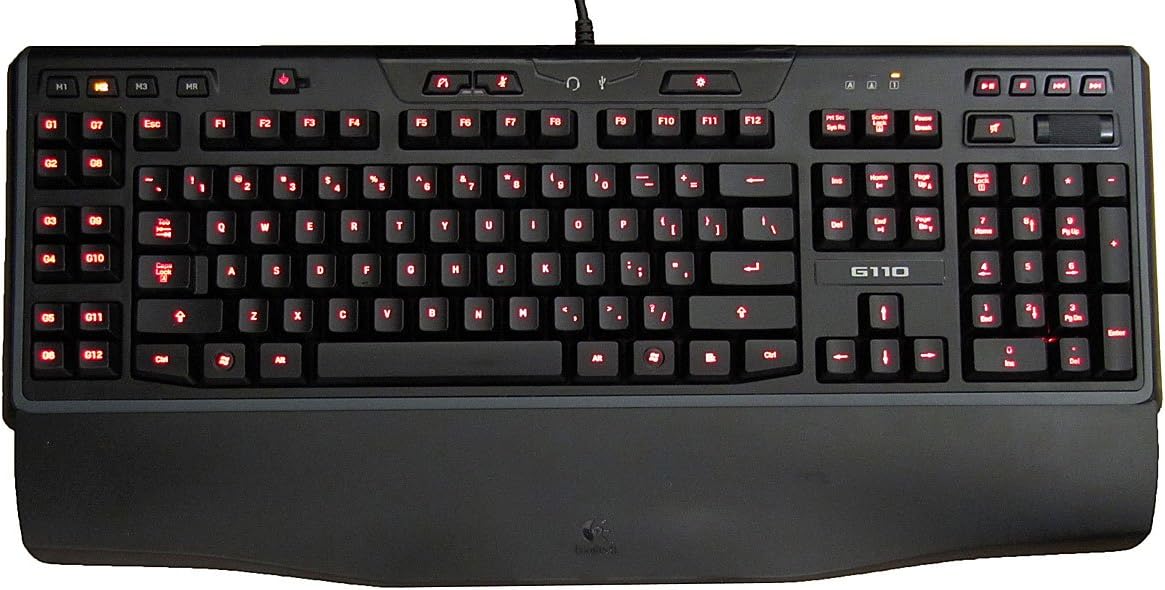
I've had this keyboard for about 3 weeks now and so far I have no complaints about it. There were some features that I was looking for in a keyboard that I couldn't really find elsewhere (did research/comparing for about a week or two). I've been using my OEM Dell keyboard for about 7 years and it was about time I got a new keyboard since I game 20+ hours a week (mainly MMO's). Here were some features I was looking for:Quiet key typing: My OEM Dell keyboard was extremely loud when I was typing and I wanted to get a keyboard that was quiet. I couldn't find many reviews about the noise level of typing but there were some and it was enough to convince me to get the G110. I looked at the Illuminated Keyboard (also from Logitech) but after hearing about how it had ghosting problems and me being a gamer, that was not going to cut it. This keyboard isn't super quiet, so if that's something you're looking for, you may want to consider something else but I feel like it's quiet enough.Back legs/tilt: This feature was a pretty big deal for me. My OEM Dell keyboard had really high legs and I've become accustomed to them and it wasn't something I wanted to give up. Many user reviews say that the legs make a very small difference in height and sadly, they were correct in that. However, I've gotten used to the lower profile and I feel like I type faster because of it. No idea why that is or it might just be my imagination for all I know, but it is something to think about if you want really high legs.No LED screen: I know, many of you may wonder why I don't want an LED screen. The main reason is the cost; it costs about $50 or so for the LED screen (comparing it to G15). There aren't many options from Logitech with the no LED screen option and to be honest, I think it is a feature that is redundant. It's nice to be able to see the power/RAM consumption but is it really necessary? At least, is it worth $50?Media options: I know media options are pretty much standard in many of these higher end keyboards but recall I was using an OEM Dell keyboard so I didn't have this option. I have only used the buttons with Windows Media Player so I can't say if it works for any other programs unfortunately but I have no complaints with its functions.Backlighting: This feature was pretty low on my list to have (I know, call me crazy). However, after having this keyboard for a while and having the option to play games in the dark, I have come to appreciate it. It comes in blue, red, purple, and a pinkish/fuchsia. I normally use red now because it stands out a bit more since the blue is of a darker color and blue on black just doesn't stand out very well. The red stands out pretty well though, I haven't used the purple or pink/fuchsia but it is brighter and closer to white. As others have said, the backlighting for some of the keys are not completely lit but unless you're OCD about things like that, it really isn't that noticeable unless you're looking at where you're typing on a consistent basis, and even then, it's usually on keys that aren't used regularly (functions keys, tab, caps lock, etc.). The one thing that is important about the backlighting on this keyboard is that it is almost necessary to have it on all the time if you are using the keyboard. The reason why I say this is because the letterings on the buttons are of this clear plastic color and not white like a standard keyboard so it makes it a little difficult to see the keys even in a well-lit room. I tried not using the backlighting when I first got it and it just didn't work out for me, so just keep that in mind.G Keys: This was also a feature that was pretty low on the list (you must really think I'm crazy now). The reason why I say that is because I find it very awkward to have to reach over to the left hand side of the keyboard to press a key. As some of you may know, playing an MMO usually requires you to use WASD to move, it doesn't make much sense to have any important keys on the G-keys. It does pretty well for non-immediate keys though (like mounting or trade 'spams'). Outside of gaming, the G-keys can be assigned to open a particular program; I have one key set to starting up Microsoft Word for when I need to type up a paper, another key to change font type and font size, and another to double spacing so 3 keys get me started working on my paper that would normally be a hassle to set up.I read many reviews from previous users and they have complained about small(er) keys. That was a huge concern for me when I read it and it almost killed it for me but after looking at other keyboards, they more or less received the same comments (all except the Illuminated Keyboard which was not a gaming keyboard). However, after getting the G110, I hardly notice the difference compared to an OEM keyboard at all. I mean they are slightly smaller but it is not enough to affect my typing. In fact, because the keys are a bit smaller with a lower profile on the keyboard, I feel like I am typing faster (and with less noise).There are two things I do not like about this keyboard, both of which are negligible. One is the USB port that is in the back. This USB port is utterly useless. Some reviewers have said this as well and I didn't get the keyboard for that reason anyway, but if you're thinking about getting this keyboard because of the USB, don't. I stuck my flash drive in there and it said it did not have sufficient power to read it. If it can't do that, why is it even there?The second thing I did not like is the palm/wrist rest. Now, I have never been the type of person to use one even on my old keyboard but I found the palm rest to be detrimental to my typing. The palm rest raises the overall height of your hand and therefore increases the distance between your fingers and the keys. Furthermore, the space bar's profile is already very low as it is, with the palm rest, I cannot hit the space bar comfortably. But again, it is something else that is optional so I can't really ding them for giving me a useless piece of plastic. On the upside, the material that they used for the palm rest feels pretty nice.Overall, I am still adjusting to the keyboard a bit because of the placement of the ESC key; I was always used to having my hand on the side of the keyboard when hitting ESC but I am unable to do that now with the G-keys there. I would definitely recommend this keyboard to just about anyone who isn't looking for something extremely fancy and/or is on a budget. I'm glad I went with the decision to get this keyboard because I don't regret it and if for whatever reason this keyboard craps out on me in the future, I'll probably get another G110.