
DOWNLOAD THE APP


Customer Services
Copyright © 2025 Desertcart Holdings Limited
DOWNLOAD THE APP


🚀 Unlock storage power that keeps pace with your ambition
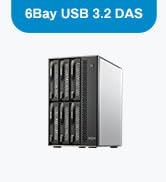
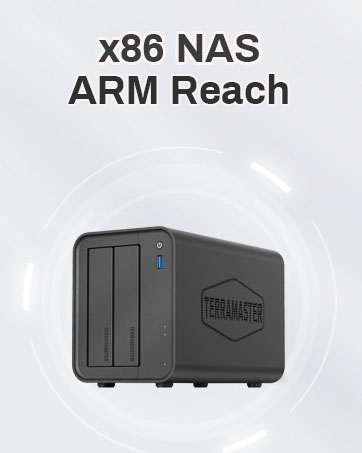
The TERRAMASTER D6-320 is a premium external hard drive enclosure featuring USB 3.2 Gen2 Type-C connectivity for blazing 10Gbps transfer speeds. It supports up to six 3.5" or 2.5" SATA drives, delivering a colossal maximum capacity of 132TB. Designed for professionals, it offers hot-swappable bays, plug-and-play compatibility across major OS platforms, and intelligent cooling to maintain optimal drive temperatures during heavy workloads.













| ASIN | B0BZHSK29B |
| Compatible devices | Windows, Mac, Linux |
| Connectivity technology | Thunderbolt, USB |
| Data transfer rate | 10 Gigabits Per Second |
| Guaranteed software updates until | unknown |
| Hard disk form factor | 3.5 Inches |
| Item model number | D6-320 |
| Item weight | 4.1 Kilograms |
| Manufacturer | TERRAMASTER |
| Material | Metal |
| Max number of supported devices | 1 |
| Product Dimensions | 22.86 x 12.7 x 22.86 cm; 4.1 kg |
K**N
Well I had 5 external hard drives hooked up to my server, I ran out of electrical outlets so I wanted something to change that. This was seamless, I shucked all the external drives and popped them in. Connected the USB-C and started up the server. All drives remained the same drive letter and I was back in business. I added some foam on the bottom as the hard drives have quite a bit of vibration when spinning (Enterprise drives) and this reduced the noise to nothing. Transfer speeds/read write are limited to what the drives can read/write and not what the controller/interface can handle. Overall great product, solved my needs, simple to setup, and I have a free bay for later expansion. The hot swappable feature is also very nice to have.
C**E
Bought in July 2024. Still working very well. Great price for a 6 bay DAS. I'm using with Win 11 Storage spaces. Two of the drives are set up in a RAID 1 config. The others are in a single drive config. Performance is very reasonable over USB 4. However don't expect super speed. If you REALLY need high performance use an internal SSD directly connected to the motherboard. I just need plain vanilla storage in a large volume with RAID configuration options and this serves me very well. To date, the drive configs have been stable with no issues. See enclosed benchmarks. I'm driving the Terramaster D6-320 with a Geekom A7 mini PC. I've moved from a tower case with a 750W power supply to the Geekom A7 and the Terramaster D6320 and I'm VERY happy. This config runs at a fraction of the power draw of my tower and is MUCH quieter.
F**C
First of all, the reviews are conflating many different devices. The devices reviewed have notably different firmware and are designed and built differently. So the overall review is not really relevant. You'll have to wade though all reviews to find the ones applicable to the product you're considering. I'm just updating my review. I have been fighting for a few months to get it to work right. Thing is, no mater what, if you happen to transfer big files, or try simultaneous transfers, it will just fail to work properly and the USB control will be reset. The reset takes some time, so forget about any kind of throughput. The kernel messages seem to indicate errors in the processing of NCQ. Trying to disable it or limiting the queue depth is not allowed. I guess the firmware doesn't implement correctly those features. Another update. I have been writing firmware for devices for years. I would be embarrassed and ashamed to unleash a product that poorly done. It is missing key features that would make the product easy and reliable to use. For example, you don't seem to be able to get each disk unique identifier, the WNN. I could go further, but at that point you figured that the device is only half baked. Sure, it will work with a basic workflow and LOTS of hand holding. The heat is not extravagant, but substantial. Al in all a device where they cut so many corners to lower the price, that it is missing its usage target. I would NOT recommend it as a D.A.S.. Or anything else for that matter.
C**X
Been running 6 drives for about a year now and no complaints! It will not power off if your PC continues to provide power over USB when shut down, but that's a limitation of some PCs--just putting the detail here to save some folks some trouble or confusion. Check your bios for settings, sometimes they're hidden.
N**O
Got a USB4 3 foot cable connected via 10gbps to my PC. Inside I have Three 16tb drives, two Seagate and one Toshiba, and one Seagate 8tb. All drives get their max capable speed without any issues. Must faster than my previous setup where drives would top out at dismal speeds. On the flip side, I got one for my father and his lessor quality USB-C cable wouldn't work correctly. I ended up splurging for him to get a USB-4 cable that was optical. where it changes the data from electrical to optical and back again. That solved his issue considering his distance issues and not being capable of putting the drives right next to his PC like I did.... absolutely use a high quality cable or you will get data corruption issues. Also make sure your drives are in good health! So far I haven't had any issues with compatibility, again 16tb and 8tb no sweat and 2 different brands. Its just a great product. I can't wait to see full on USB-4 based versions in the future for even more faster speeds!
Trustpilot
1 month ago
1 week ago