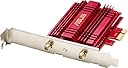
🚀 Upgrade your desktop WiFi game — fast, stable, and hassle-free connectivity!
The ASUS PCE-AC56 is a high-performance dual-band PCIe WiFi adapter delivering up to 867 Mbps on 5 GHz and 400 Mbps on 2.4 GHz with Broadcom TurboQAM tech. Designed for desktop PCs, it offers extended wireless coverage with a high-power antenna and advanced security protocols. Compatible with multiple Windows versions, it ensures easy plug-and-play installation and stable, lag-free connections ideal for gaming, streaming, and professional multitasking.


| ASIN | B00JNA337K |
| Best Sellers Rank | #724 in USB Computer Network Adapters |
| Brand | ASUS |
| Built-In Media | External magnetic antenna base, Low Profile Bracket, PCE-AC56, Support CD, Warranty card |
| Color | Multicolour |
| Compatible Devices | Desktop |
| Compatible Operating System Family | Windows |
| Customer Reviews | 4.4 out of 5 stars 5,296 Reviews |
| Data Link Protocol | IEEE 802.11ac |
| Data Transfer Rate | 1300 Megabits Per Second |
| External Testing Certification | CE, FCC, C-Tick, IC |
| Global Trade Identification Number | 00809394253388, 00886227504763, 04716659504856, 04716659504863 |
| Hardware Interface | PCI Express x1 |
| Item Dimensions L x W x H | 4.72"L x 3.54"W x 7.09"H |
| Item Type Name | Asus Wireless AC1300 PCIe Adapter (PCE-AC56) |
| Item Weight | 0.23 Pounds |
| Manufacturer | ASUS Computer International Direct |
| Mfr Part Number | PCE-AC56 |
| Minimum Required Operating System Version | Windows XP |
| Model Number | PCE-AC56 |
| Product Dimensions | 4.72"L x 3.54"W x 7.09"H |
| UPC | 809394253388 886227504855 012300426107 012303195413 803982825087 886227504862 724627231912 731215289071 886227504763 983184724422 |
| Warranty Description | 3 Years |
M**L
Buying my third one now....and not because they break
I don't usually take the time to do reviews for things unless they are horrific or terrific. This is obviously a terrific device. Long story short, we bought a new house and changed over to Fios. At my old house I had my "office" (adult playroom) in the basement and had Ethernet. I'm on the top floor now and the WiFi router is in the basement in the utility room. I had to buy a wireless card for my main PC so I opted for this as it sounded pretty good. Installed it and about 20 minutes later I was ordering one for my son. I had no idea that WiFi was this fast. I had plans to get extenders or repeaters and stuff like that because of the distance and low signal, but the antennas do a good job allowing you to tweak it in (I think that the Windows store has a strength meter) so I saved the hassle and cost of doing that. Plus I don't want my WiFi bleeding over to the entire neighborhood. Anyway the wife's computer just took a dirt nap and we put together a new box for her and installed an old WiFi card.....it works....technically, but it is not even close to the same level of performance (due to being only 802.11n capable). I'm paying for gigabit Ethernet and Verizon delivers the full speed; why would I not want to have as much of that available as possible? There are cheaper alternatives out there....they may work fine, but this is one of those items that I researched that I half expected to deliver about 50-70% of what it advertised and it delivered about 90-95%. I hit over 400Mb/s down and about 350-400Mb.s up over 5G (using Ookla) and I'm far enough away that other 5G devices that I own can barely connect. I love these things. As far as installation and drivers are concerned I opened the box, slapped it in, rebooted and connected. Now I don't know about specific MB configurations creating issues, but I didn't install any of the official drivers or utilities because it did everything I needed with the Win10 stock stuff. I believe that my son checked out the Asus ones and their utilities, but said that there was no difference. I can't guarantee that everyone will have the same experience, but I've got a new card coming in a few hours and will be installing it into a third computer and expect to have the same hassle-free, extremely gratifying experience. If not I'll update my review. There's just not a lot of stuff out there that really lives up to the sales hype or even the full level of the basic standards. This is one of those devices that does in my opinion and it's worth the cost. Couldn't be happier with the performance and ease of installation. It just works. No screwing around, no digging into special settings or menus or such....plug it in and connect to your WiFi. Its how stuff is supposed to work.
A**N
Excellent Wi-Fi PCI Express Adapter
I've had bad experiences with wireless setups before. Many of problems with wireless is slower internet speed, internet cutting out from time to time. Its just been a hassle. To everyone reading this, steer far away from USB adapters! I broke my brand new Netgear and decided to open it up, it has the smallest receivers inside. This Asus card is at least two to three times more powerful! I'm very pleased as I came from Netgear USB dongles that would drop connections randomly throughout the day/week. Ever since I bought this, no problems at all, not a single connection dropped! Streaming and gaming is flawless, I couldn't have asked for more. However, if you are a hard core gamer, this may not be for you, as your probably looking for a direct Ethernet connection, otherwise its fine. If you are not tech savy and can not open up your computer and install it, you may have some difficult times. However, there is nothing wrong with the product as thats how it is supposed to be. After all, its a PCI-e internet adapter. Excellent PCI Express Adapter. I'm very satisfied with my purchase. I own the Asus RT-AC68W and difference is NIGHT AND DAY! I have much greater range than I used, however it does not beat a direct connection with Ethernet, however I'm very impressed. Here are the pros and cons. Pros: Easy to install if you know what your doing Lights indicate that its working Simple software install and your up and going, it took me 5 minutes to install and get the card working. Superior range and speed compared to adapters like Linkys and Netgear. Good quality, 95% of it is pure metal casing. Cons: Requires access to inside the computer. Not suitable for a non-tech savy person. Besides that, I think its an awesome card. It really does preform well over other brands. I would recommend this to anyone who is able to install this on the motherboard.
H**R
Great Wi-Fi Adapter. Dependable. Easy to setup. Fast and with a Great Range.
I love this wifi adapter! It was easy to install with no problems. I have used it on both bands: the 2.4gHz band and the 5 gHz band. It is located about 50 feet from my TP-Link Archer C5 router. I have found that the 5 gHz band gives me slightly faster speeds and with a lot less network congestion. My ISP provides 66.26 Mbps download speeds as tested from my cable modem to computer #1 via a direct wired connection. This Asus PCE-AC56 Adapter consistently provides the same 66.26 Mbps download speeds. It uses the Windows wireless zero configuration Utility which is native to Windows 7 automatically which I like. The Asus wireless utility software works well in allowing me to choose which band and which SSID I want to use and in providing a limited amount of feedback on the device. Over the years I have had to problem solve all kinds of hardware and software problems which I hate, and with this device there have been NO PROBLEMS which is the main reason I like it.
A**R
No issues for me, but the lack of any installation manual could be a problems for those without experience with PCs.
Had a TP-Link Low profile Type N card that only ran on 'G', based on that if I set the router to 'N' only, the TP-Link stopped working. I looked into updating drivers, but far as I could tell Windows 10 manages drivers. I looked in all the settings for the card. Couldn't find anything. So then I went to Amazon and found this. I was concerned about the price. But I needed to get this problem solved; according to an article on Ars Technica website, if you let your router still use any of the older 'G' 'B' or 'A' 802.11 [ ], it takes longer to transmit its message, including broadcasting the SSID, in the 2.4 GHz. Basically everybody slows down in your neighborhood. So when I popped this card in, W10 found it, updated the drivers (and the drivers had to come thru this card), then I changed the router to 'N' only (pretty easy in DD-WRT) and bam! instally speed up web browsing the that computer, and probably all wireless devices in the house too. But everything is not rosy here. The instructions. Will, no instructions. I mean a Warranty card, a 'Don't return this before calling us card", and maybe an FCC card. But zero instructions. If you have never opened up a computer case, the lack of instructions could be daunting. I have done it many times in my life, but I am nerd. I mean, honestly the hardest part of these things is getting the case open and closed when you are done. and then make sure you touch the metal of the case to discharge static electricity before touching the card by its edges or get a wrist strap. I had to install the low profile bracket, again, not for the total novice. It is possible someone simply forgot to put the instruction sheet in. The card construction is very typical of the high quality I expect from Asus products. Wish I could give it 4.5 stars, but if reviewers aren't honest the whole thing falls apart. DD-WRT has a live updating received signal strength indicator for wireless clients on their device web page, this card was coming in at 100%. I used ipconfig /all in a command window to get the MAC address so I could make sure I had the right one in the list. You should be able to find the IP address of your router in the same ipconfig /all, Should be something like 192.168.1.1. or 10.1.1.1. I have no clue which routers have software can tell you the RSSI of their clients, only that DD-WRT does. The adapter also comes with a magnetic base to mount the antennas is a different way. Since metal reflects electromagnetic waves (its called a ground plane), and the router is in the basement, I figured I was better off with the antennas on the back instead of top of the computer, but each installation's conditions is (are?) different. Antennas seemed like better quality on this device over the TP-Link. Also has AC, but at the moment our router is type N tops. A future amazon.com purchase, but I wanted to get to the weakest link first. This card gives you some future proof. I don't know much about AC 5 GHz though, seems like there are different speeds; a future project. Personally, if in the market for a new adapter, don't buy unless it has AC. Don't buy a smart phone unless it has AC, anything new Apple, Samsung, Pixel should, its the mid or low range that might stop at N. At one time I had a USB to N type adapter, and with a solid state drive, the web browser would open up before the card was initialized, and my wife would keep asking me what is wrong, and I got tired of trying to explain just close and re-open the browser. So no more USB wireless for me.
M**L
Good for gaming
Haven't had it long, first day but so far its works great with my asus RT-AC66R router. M'y 5G connection only gets 2 bars yet the connection speed (284 GB/s) is still faster than the 2.4G. Win 10 64 had no problems installing it. The software on the cd is good. Gaming seemed very good and fine! In overwatch i had 25 ping and that's with the lowest tier internet here. I know its not as quick as cat5 but it works when you cant run a cable. I will update the review if I need to but 5 stars for now. 08/27/2016 - Alright, been having a few problems with it. Its finally working good again now after seeing one person's forum post I did the same pretty much. This is for windows 10. -go to settings, network status, click change adapter options. -right click the adapter and go to properties. -delete all the networking protocols you can (such as client for microsoft networks etc, some you can't uninstall like tcp/ip v4 and v6) -click ok -right click the adapter - uninstall -reboot -Good to go now BUT, and I just seen this, go back and install networking protocols (I put client for MS networks, file and print sharing, LLTDR and LLTDMI/OD (I dont know what these are but, whatever). I didnt reinstall the software or mess with the driver, just use what windows 10 gives you after you reboot. - Works great now!
B**C
Absolutely Impressed. Highly Recommend. (40-60mbps) 50+ ft from comcast modem. (Worth Every Penny!! :)
I was looking for something for my desktop to connect with wifi, I found this and I have always like Asus products, Anyways It was very easy to install on my compaq stock desktop I currently am running on windows 10, I did not even have to use the CD that comes with the wifi adapter, once I booted the comp up the card was detected. I did have an issue connecting to my wifi networks As I was originally running it off of the xfinity hot spots. I am now running it off a comcast modem/router from about 50-75 feet away and with the antennas just on top of the tower ( love the magnetic antenna stand) I am getting 40-60 mbps, granted with current xfinity service only allow a max of 100 mbps being hard wired. So for being 50+ feet away with just this asus wifi adapter and getting 40-60 mbps im very very impressed, Runs games very smooth, stream netflix and comcast live tv with no problems no lag very stable connection.. Well worth money spent I would highly recommend this for anyone needing to connect with wifi.
L**D
Easy to install. Works perfectly with Windows 8.1. It can be made compatible with Linux.
I just got this in and installed it in a desktop computer that I had purchased without WiFi. This card was easy to install and is working perfectly. What more is there to say. The antennas can be attached directly to the card, or the box came with extension cables to set the antennas up around 3 or 4 feet from the computer. User choice. I simply attached them directly to the back of the card. Update a few hours after posting the Above on March 19, 2016 I got the Win 8.1-64 setup with the WiFi card without any problems. Then I attempted to setup a Linux Mint partition for it. Linux Mint can't locate this card. I reduced my rating by 1 star to 4 stars because this card does not seem to be compatible with Linux. Update March 22, 2016 I said before that this adapter is not compatible with Linux. I was wrong. The ASUS website says that it only works on Windows operating systems. And you have to search for the information. But I found out that it will work on Linux Mint and Linux Ubuntu systems using the Broadcom STA drivers. I tried it out on Linux Mint 17.3. The down side is that you need to have a cable connect to update your drivers before you can use this card. But you can use it with a testing CD. (I don't know why the drivers don't transfer from the CD to the hard drive when you install Linux Mint. I have to temporarily setup and run 200 feet of cable for a line Internet connection.) But anyone who has used any version of Windows 8, or Windows 10, will know that both Windows 7 and Linux are much more safe and fun.
S**H
Runs flawlessly at 2G. Trying to get this to run at 5G will be a nightmare.
What can be said about this product. It looks nice and worked for exactly 1 min in the 5ghz range before never working correctly again. I was very excited to purchase this card, as my older card is 2G and does not take advantage of the 1000/mb up and 1000/mb down provided by my ISP. So I ordered this, having been very pleased with the motherboard I have purchased from this company many years past on an old gaming rig. Product arrived in an envelope, and the contents inside were strewn about. While everything looked new(and had that new electronic smell), absolutely NOTHING was sealed, with each vacuum sealed bag opened. This was a red flag that I should have returned this product immediately instead of wasting 10 hours of my time trouble shooting. A device like this should be plug and play...period. And at first it certainly seemed that way. Windows 10 recognized the device straight away and switching to it and disabling my other integrated card was as easy as a few clicks of a mouse. I run an internet speed test, and it shows speeds of what I have always had in the past. 28mb/down and 30/up with a ping of 5. Ok, no big deal it was just broadcasting in 2g. So microsoft drivers aren't going to be enough, and I need to download the companies drivers and I do so in quick order. The next test blows my mind. A ping of 0! Download speed 785! Upload of 1000! I was thrilled, and then my computer crashed in a way I have never had it crash before. A forced restart. This would be the first of a dozen, each one taking 5 min to resolve, or never resolving at all. I tried every trick in the book to get this card to work, and it never worked correctly again. Forum after forum, sliding back drivers, I even did a reinstall of windows. From that point on the card would connect to my network for 25 seconds at a time and then disconnect in a never ending loop with a random restart thrown in for good measure. So if you enjoy wasting your afternoons, and having blazing fast speeds for half a minute at a time this card is for you! I had been warned about ASUS' dip in quality, but I had hoped it was just bad luck on the part of my fellow pc enthusiasts. I do not think I will be purchasing any more products from this company in the future. A shame really, they used to be the gold standard for quality. I have over two decades of computer experience and feel that I did absolutely everything to get this product running as intended. Very disappointing.
L**E
Perfetto per eliminare i cavi dalla propria scrivania
Il prodotto consiste in una scheda di rete Wi-fi per pc di alta gamma ed elevate prestazioni. All'interno della confezione troviamo tutto il necessario per una corretta installazione: - scheda di rete - due antenne - cd e manuali di installazione - prolunga per le antenne - coperchio retro case ***QUALITÀ GENERALE*** Il prodotto presenta un ottima fattura, il corpo è interamente in alluminio, la scheda di rete come già accennato è ad alte prestazioni, assicura copertura su 2.4 e 5 GHz, con velocità assicurate fino a 867 Mbps. Ottima anche la prolunga con base magnetica che si può installare al lato del case per non perdere potenza del segnale wifi, utili anche le antenne orientabili. Il prodotto presenta una tecnologia tale da potenziarne le prestazioni su canali a 5 GHz. ***MONTAGGIO*** Non sono necessari ne avvitatori ne viti, la scheda è plug in quindi si collega alla scheda madre e si poggia sul case nella parte posteriore, per l'installazione del software basta inserire il cd e seguire la procedura, facilissimo. ***PRESTAZIONI*** La mia abitazione è dotata di fibra 1000 Mbps, il pc è distante 10 m dal router con un paio di pareti nel mezzo, nonostante ciò lo speed test assicura 5ms ping e 535 Mbps sul canale a 5 GHz. ***PREZZO*** Acquistato in sconto e secondo me vale fino all'ultimo centesimo. ***CONCLUSIONI*** Il prodotto è molto valido, rispetta quanto promesso e risulta essere molto abbordabile, quindi se anche la vostra postazione pc è distante dal modem questo è il prodotto che fa per voi
W**.
Vraiment belle surprise
Cet avis est authentique, pas un avis chinois truqué blabla. Je viens d'enménager en appartement , dans un vieux batiment refait a neuf à l'intérieur, j'ai testé des prises CPL qui ne m'offrait pas vraiment un débit à la hauteur de ma souscription Fibre Sosh. J'ai utilisé des vieux CPL, pas très concluant je tournait à 50 Mbps en ascendant/ descendant, je pense que j'aurais pu avoir mieux avec des CPL tout neuf, mais je pense que je n'aurais pas dépassé les 100 MBps, peut être du au réseau electrique. J'ai pris cette carte en me fiant aux avis sur différents sites (ldlc, materiel.net, amazon... forum) , ce n'est pas la dernière carte sortie, ni la plus vieille, mais je me suis fié a l'expérience des autres. La carte fait vraiment "robuste", bonne qualité, on voit que c'est pas un truc a 15euro. L'installation se fait plutot facilement, je ne suis pas bricoleur et j'ai réussi en 10min top chrono. Pas besoin de forcer, il faut juste clipser la carte et ensuite visser. Ma connexion actuelle est désormais de + de 270 Mbps en descendant et + de 220 en ascendant, le jour et la nuit, je peux télécharger un film en 2min50 et tout mes contenu tourne en full HD 1080P, la connexion est stable. Honnêtement, au vu du prix, je la rachèterai les yeux fermés, pas besoin de prendre la dernière carte sortie a 200 euro, celle ci fait largement l'affaire.
E**S
Buena recepción de señal
Es buena antena que recibe bien la señal, solo que en mi caso yo prefería quitarle las antenas, porque se me hacían estorbosas, y aun así recibía señal, claro que no la usaba para jugar en línea, solo para descargar o ver algunos videos o películas sin problema.
V**R
Extremely appropriate for gaming. Flawless.
I wanted to see what it would be like to wifi enable a desktop gaming computer. I got rid of long wlan cables, patched some holes in the wall and turned off intel lan adapter in my BIOS. Ever since, it feels like it's still directly connected to the router, because of the excellent pings I get in different games. Note that the screenshot was taken on an North American server while I'm living in North America. I always get about 24-32 ping which is great. Downloads are extremely quick, everything pleases me about this little pci card. This is definitely a reason to go wireless. I would say something about the software but I don't use it. It's a plug-n-play card, you install it and windows finds and updates the drivers immediately so you can get to browsing/doing whatever you do online. Foolproof, extremely quick, latency/ping is always steadily very low, so are downloads. I have a Bluetooth chip right under my antennas and there is zero interference. F***ing flawless, ASUS
D**L
Funciona muy bien en W10, pero OJO con el driver
ASUS PCE-AC56 me parece un muy buen adaptador, con buena sensibilidad y que ofrece velocidades estables. Pero a quien tenga W10 le advierto sobre los problemas con los que puede encontrarse por el driver. Me funciona perfectamente, aunque el driver que he necesitado instalar no lo he encontrado ni en la página de Asus (al menos no está para este modelo) ni lo lo ofrece W10 mediante plug and play. Corresponde al fabricante del chip que incorpora este adaptador (Broadcom). Esta es mi experiencia, con un W10 de 64bits, muy recientemente actualizado a la revisión 1709 (Fall Creators Update).: --- PASOS y PROBLEMAS IDENTIFICADOS --- - Desde la página de soporte de Asus se señala, con fecha de julio 2015, que el dispositivo funciona en W10 y que no precisa de drivers, que ya los incorpora W10: ASUS PCE-AC56 Windows 10 Plug and Play Support <<This client card supports windows 10 plug and play. Do not need driver CD, driver is included in Windows 10. When the client card is inserted into a computer, Windows attempts to download and install the client card driver if it is not already available on the computer.>> - Hago caso y no instalo nada. Pero cuando arranco el equipo, el Sistema me señala como dispositivo de red el siguiente: "Adaptador de red 802.11a Broadcom", Proveedor: Microsoft, Fecha: 02/06/2013, Versión: 6.30.223.256 Por ningún lado se hace mención al protocolo 802.11ac ¿? Lo veo raro, aparte de lo antiguo del driver. - Compruebo que con fecha de 2017/03/24, y también para Windows 10 64-bits, desde la página de Asus es posible bajarse una utilidad: "ASUS PCE-AC56 Utility 2.1.3.8" (UT_PCE_AC56_v2138.zip) Verifico que permite tanto instalar una utilidad para gestionar las redes a las que conectarse (que no aconsejo en aboluto, pues es muy mala), como un driver. El driver lo reconoce Windows y su nombre se corresponde con el adaptador ("ASUS PCE-AC56 Wireless 802.11ac" creo que era). El proveedor de ese driver es ASUS, con fecha de 2015 y versión 7.35.315.0 - Todo aparentemente normal... al principio - El adaptador reconoce tanto redes 2.4Ghz como las de 5GHz. La sensibilidad parece ir muy bien. Pero me extraña que a pesar de usar dos canales en la banda de los 2,4 GHz y tener una señal sobre los 47 - 50dB, la velocidad que me ofrece es estable pero en 150 Mbps. Con 5GHz sólo me ofrece alrededor de los 175 Mbps. - Pero lo peor: comienzo a sufrir continuos PANTALLAZOS AZULES (BSOD) con el mensaje "PAGE FAULT IN NONPAGED AREA". Aunque había pasado hacía muy pocos días a la versión 1709 de W10, el sospechoso era el adaptador.. - Veo referencias al problema desde un foro y se confirma el problema de manera muy clara simplemente lanzando un test de velocidad: provoca al momento el pantallazo azul. - Decido volver al controlador anterior, "Adaptador de red 802.11a Broadcom". Funciona bien y no provoca pantallazos azules, pero las velocidades son como las de antes (150Mbps / 175 Mbps). No parece el driver correcto. --- SOLUCIÓN --- - Pero desde el foro confirman también que con otro driver (de Broadcom, al que corresponde el chipset) se resuelve el problema. Y coincide con mi propia búsqueda de drivers para el adaptador, cuyo ID de harware es: PCI\VEN_14E4&DEV_43B1 (BCM430AC) *** El driver correcto es: Broadcom BCM-43xx Wireless Lan Drivers Version 7.35.317.3 WHQL, Date & Version: 02/03/2016, 7.35.317.3 - Cuando lo instalo aparece como "Broadcom 802.11ac Network Adapter" Proveedor: Broadcom, Fecha: 03/02/2016, Versión: 7.35.317.3, Firmante digital: Microsoft Windows Hardware Compatibility Publisher Funciona perfectamente. He pasado varios test de velocidad sin ningún problema. Y ahora las velocidad que obtengo son estables, y se corresponden con las especificaciones del adaptador: 2,4Ghz: 300 Mbps, 5 GHz: 866 Mbps (En 2,4 Ghz estoy usando el protocolo 802.11n, que llega hasta 300Mbps. Al parecer se puede llegar a 400Mbps con TurboQAM, que por ahora no sé cómo) Tengo el router de Movistar y en mi caso o me conecto a mi red de 2,4GHz o a la de 5GHz (puedo tener dos), pero no me parece posible conectarme simultáneamente a las dos bandas, como creo que sugiere el AC1300. Supongo que un router más avanzado sí será posible. ------------- Por las directrices que deben cumplir los comentarios, no puedo incluir ninguna URL externa a Amazon, ni siquiera aunque fuera la de soporte de este producto, de ASUS. Y por supuesto no puedo poner la URL del foro a que hago referencia y desde donde puede accederse a más información sobre el error y desde donde se facilita el localizar el driver correcto. No puedo, aunque sirva para ayudar a quien esté interesado en este adaptador. De todas formas, buscando en internet por BCM430AC o << "PCE-AC68 Windows 10 Drivers" page fault in nonpaged area >> se debería poder localizar fácilmente la información necesaria. (Nota: El foro es sobre el adaptador PCE-AC98, pero los problemas son los mismos que los de PCE-AC56 y la solución también, pues el driver soporta ambos dispositivos") Espero que sea de utilidad la parrafada. Al menos a mí me habría ayudado a evitar todos los problemas con los que me he encontrado * Actualización 14/08/2019: Tengo actualmente la revisión 1809 de W10 y sigo encantado con esta tarjeta de red. Ningún problema y la sensibilidad y ancho de banda como el primer día: 2,4Ghz: 300 Mbps, 5 GHz: 866 Mbps
Trustpilot
1 month ago
1 month ago