


🚀 Elevate your workspace — the mouse that works as hard as you do!
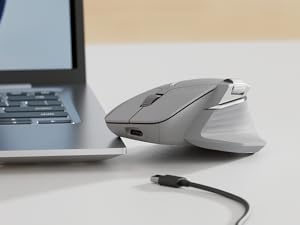
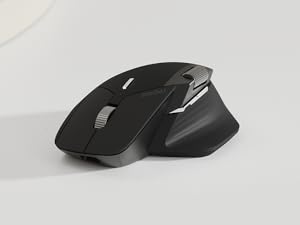
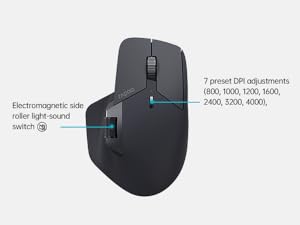
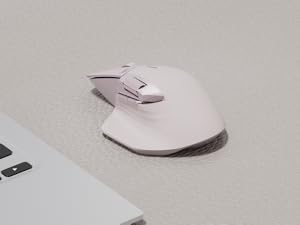
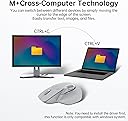
The Rapoo MT760 is a cutting-edge multi-device wireless mouse featuring tri-mode connectivity (Bluetooth 5.0 and 2.4GHz), 11 programmable buttons, and a high-definition 4K DPI sensor. Its ergonomic design supports all hand sizes with anti-slip and sweat-proof materials, while M+ Cross-Screen technology enables seamless control and file transfer across up to 4 devices. Equipped with an 800mAh battery and USB-C rapid charging, it offers up to 90 days of use, making it the ultimate productivity tool for professionals juggling multiple devices.


| ASIN | B0D4Q6MJ8T |
| Amazon Bestseller | #6,457 in Computers ( See Top 100 in Computers ) #190 in Computer Mice |
| Batteries Included | Yes |
| Batteries Required | No |
| Battery Average Life | 90 days |
| Brand | Rapoo |
| Color Name | gray (light gray) |
| Compatible Devices | Personal Computer |
| Connectivity Technology | USB |
| Customer Reviews | 4.0 4.0 out of 5 stars (1,237) |
| Date First Available | May 21, 2024 |
| Finish Type | Matte |
| Item Model Number | MT760 |
| Item model number | MT760 |
| Manufacturer | Shenzhen Rapoo Technology Co., Ltd. |
| Material | glass |
| Operating System | windows |
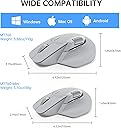
| Product Dimensions | 12.34 x 81.69 x 0.1 cm; 340 g |
| Size | 標準 |
| Special Features | Programmable Buttons, Wireless |
K**様
2.4とBluetoothが使えるのでとても気に入ってます。 強いて欠点を上げるとなると、キーボード入力時に横スクロールのホイールに触れてしまいセルが動いてしまうところ。 キーボードとマウスの位置を気を付ければ良いだけですが。 他は何も不満はありません。 良い買い物でした。
T**2
まあ有名品のソックリさんで、値段もかなりリーズナブルだったので,ダメモトで買ったのですが、これが意外と使いやすい。特徴のサイドローラーはクリック無しですが,エクセルで資料作成する際はセルの横動きがとても便利。動き方も適切でエクセルメインで仕事するなら気にいると思います。 ブラウザでは横ローラーは使う機会がが少ないですが,拡大ズーム時にはローラーで横スクロールできましたが,こちらはオマケみたいなもの。 大きさは今までエレコムマウスのXLを長年使っていたので,これは小さいかなと不安でしたが,MT760は大きめらしいので、長さが変わらないことや、サイドの親指部のサポートがあるため、むしろこっちの方が握りやすいくらいでした。手の小さい人はサイズの小さい方を。 握りやすさなどの利点は、ベース(?)とした製品の良さによるのでしょうが、パチモノ感が気にならなければ納得できると思います。 カーソル速度調整は段数多すぎるので、切り替えが面倒なので実質使えませんが、自分は一度決めたら動かさないタイプなので,ここらは使い方次第で評価が変わるかな。 ブラウザバックボタンがサイドローラー直下にあるので、サイドローラー操作時に誤作動するかなと思いましたが、チョットだけボタンが高くなっているので、ギリギリ使えています。 表面やボタンなどの耐久性は不明ですが、値段相応に持ってくれればいいかな。 Bluetoothで使用していますが,レスポンス等でも不満ありません。 新品状態で下面のスリ板樹脂に保護シールまで貼ってありましたので、手間はかけている商品のようです。今後耐久性に問題が出なかったらリピートします。 評価⭐︎5でもいいかと思いましたが、サクラレビューに見られるのもシャクなので,あえて⭐︎4です。
I**I
仕事用に購入しましたが、とても使いやすくて大満足です🥹🖱️✨手にしっかりフィットする形で、長時間使っていても疲れにくく、操作もとてもスムーズです。 Bluetoothと2.4GHzの両方に対応していて、複数のデバイスを簡単に切り替えられるのが本当に便利でした💻📱パソコンとタブレットを使い分けることが多いのですが、ボタンひとつで接続先を変えられるので作業効率がかなり上がりました! クリック音も静かめで、周りを気にせず使えるのも嬉しいポイントです😊ボタンの反応も良く、自分好みに設定できるので、細かい作業も快適に行えています。 バッテリーの持ちも良く、頻繁に充電しなくていいのも助かります🔋見た目もシンプルで高級感があり、デスク周りがすっきり見えるのも気に入っています✨ 機能性・使い心地ともにとても満足していて、毎日の作業に欠かせないアイテムになりました!
H**E
MT760を購入しました。今まで使ってきたサンワサプライの横スクロール対応のマウスで、横スクロールのホイールが故障したので買い替えです。(画面上はMT760とありますが、届いた箱にはMT760Lと記載されていました) 連日の在宅勤務&多残業、休日もパソコンを多く使っていることか?、最近のマウスは1~2年で故障することが多いですが、このマウスの耐久性に期待したいです。(乱暴に扱うことはしてません) 全体的に、クリック感や横スクロールのホイール感覚は◎です。特に横スクロールの使用感は、サンワサプライやオーム電機のより使いやすいです。 以上の通り、使用感としては★5点ですが、一番残念だったのはサイズです。MT760では大きすぎで使いにくいです。 MT760miniにすればよかったな、ととても後悔しています。 購入前に記載されたサイズで確認はしたものの、現物が届き使ってみると大きすぎて使いにくい、です。 靴なんかは返品交換自由の店が多い印象ですが、マウスもそんな制度があればな、と感じました。 なので★3点です。
小**輔
横スクロールのホイールが欲しくて買ったが、感度が良すぎですぐ左右に行ってしまう。大量のページを送りたい時はよいが、細かな調整が聞けばより良さそう。
B**B
L社のMXに非常に似ているのですが、重量がMXに比べて軽量で掴みやすいので 長時間作業するのには最適だと感じました 自作で動画編集や画像処理などマウス作業する場合はスクロールやサムホイールの完成度の低さから少し苛つきますが 表計算やブラウジングなどの仕事での使用にはかなり快適です ホイールもカチカチと小気味よく回り、サムホイールも列スクロールも快適です センターにあるボタンはDPI切り替えなのであまり普段は使わない機能です ドングルが標準で2個あるので、職場と仕事用ノートにそれぞれつけっぱなしにする事も出来ますし Bluetoothデバイスを3台接続出来るので、スマホにも利用可能です その場合背面の電源スイッチの切り替えをしないと行けないのでドングル2個挿しが一番便利ですね あまり細かい作業には向かないマウスですが、少し高級感あるマウスを職場で自慢したい方やオフィスソフトだけ利用するなら十分使いやすいマウスだと思います 充電ケーブルの他にワイヤレス充電もオプションで用意されている様ですが、そこまで頻繁に充電しないので今のところこのまま使いたいと思います
M**N
自宅用がとても使いやすく、出張時に持ち出していたのでオフィス用に追加。 前回のものはBluetooth×2とドングル×1だったが、今回購入したのはBluetooth×1?とドングル×2のもの。よく見ないで買ってしまったがBluetooth×2のほうが良かった。 大きさも使い勝手も申し分なかったが、今回はちょっとハズレを引いてしまったようで、しばらく使うとBluetoothが切断されるという症状が発生。 スイッチでBluetoothとドングルの切り替えると直るが、これが結構な頻度で起こるようになってしまった。 前のがとても良かっただけに、今回のはたまたまだと願いつつ交換対応を依頼予定だったが、返品交換は1ヶ月しか対応しておらず、こういった意味ではLogicoolなどのほうが安心なのかもしれない。
K**E
説明書は日本語ではないので、Macでの2.4GHzモードでの設定方法を簡単に説明する。 RAPOOのサイトの「Support」-「Download Center」からMac用のドライバをダウンロードする。 インストール時に「開発元が未確認」エラーが出た場合は、「システム設定」>「プライバシーとセキュリティ」を開き、「ダウンロードしたアプリケーションの実行許可」の下にある「このまま開く」ボタンをクリックする。 インストールされたフォルダ下のドライバ「A HUB.app」を開く。 アクセシビリティの許可を求められるので、ONにする。 ドライバ画面右上の「設定」で「レシーバとペアリング」を選び、手順に沿ってペアリングすればよい。 ドライバでは、DPIやキー割り当て等の詳細な設定ができる。 底部のスイッチを「BT」にすれば、Bluetoothで接続することもできるため、接続先を瞬時に切り替えられる。 特長としては、以下が挙げられる。 ・横スクロール用のホイール付き。 ・中央の細長いボタンでDPI切り替え。 ・プロファイルを編集や作成して、DPIやキー割り当てを設定可。 ・複数のPCに接続したままで、クロスオーバーにマウス移動。 女性としては手は普通サイズだが、上から手を置いた感覚はとてもしっくりくる。 特に親指が支えられているので、疲れにくいのもよい。 真ん中のホイールはややカチカチ感があり、横スクロールのホイールは滑らかに動く。 もう、元のマウスには戻れそうもない。
D**S
UPDATE: I love this mouse so much I bought 3 of them for the different computers around the house. Still say it kills the Master MX 3 and I think is actually a very competent replacement for the 4. I don't understand the hype for the 4...its still essentially the same, very good, but very expensive mouse. I have been pretty strictly a Logitech person since, oh I dunno, wireless adapters and keyboard + mouse combos came out. I probably have 7-10 different Logitech sets between home and work, and frankly, everything works pretty great most of the time, so no shade to Logitech. However, Logitech demands a premium that’s roughly 2x that of other products that do the same thing…and sometimes those other products even do it better. This is one of those products…half the price, better technology with NearLink than either Logitech’s unifying adapter or Bolt. Higher DPI, and in my experience so far, equal build quality and better responsiveness. I have Logitech Master 3S mice (3 of them…) and when I debated getting a Master 4, the reviews I read were good, but not great for something Logitech has had so many years to improve. And, for $120 I feel like generational improvements should be substantial…but they weren’t. So, I decided to ditch the Master 4 and see what else what out there… I decided on Rapoo MT760 Pro an I love this thing. It is extremely comfortable for extended use, it fits my hand like a glove (sorry OJ), it reliably lets me control the 2 devices I have it connected to, it is buttery smooth when scrolling, and battery life, a few weeks in…well, I haven’t had to charge it. Also, the clicks are slightly louder than my 3S, but in an oddly satisfying way (like, almost an ASMR type thing). The only thing I haven’t tested is the Bluetooth connectivity, but that’s pretty formulaic at this point in mouse history…doubt there’s much to comment on there. Rapoo went with a very recent standard of Bluetooth and it likely works iteratively better than the previous versions of the standard.
D**N
Great mouse. Battery lasts a long time have had it for months now still haven't charged it
J**N
Love this mouse. Use it daily for work, 8+ hours a day. They last me about 2 years at this rate. Only have to charge it every few months. I cannot use a mouse without my side wheel anymore or the back buttons. I use a lot of design software and Microsoft products for work and it helps so much. Definitely worth the purchase, especially if you want to save money from buying a name brand mouse Why did you pick this product vs others?: Better price, looks better
C**Y
This is an excellent Bluetooth mouse that is rechargeable. The charge lasted so long that I was trying to find the battery compartment because I forgot it was rechargeable. IMO the best thing about it is that it easily connects to my HP laptop, iPad, and Windows based desktop with just a click of a button. I haven’t used a mouse with an ipad before but it comes in pretty handy sometimes. The shape is very comfortable and it has a little more height than most which I like. It has a thumb roller to scroll with or you can use the roller on the top. I would buy again but it has been built to last.
B**9
I have both this and the more expensive competitor mouse. Pros: Cost, feels comfortable,has almost all the features as it's 2 or 3 times more expensive competitor. Battery life is fantastic. Con: no software for customization If you just need a solid wireless mouse with side scrolling for excel, I am impressed and a big advocate of this mouse. I purchased the more costly competitor for the wife and bought this one for me. It is just as good.
Trustpilot
1 month ago
3 weeks ago