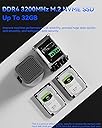
🚀 Compact Powerhouse: Elevate your workspace with speed, storage, and seamless connectivity!
The AOOSTAR R1 Intel N150 Mini PC is a compact, high-performance barebone system featuring a 4-core 3.6GHz Intel CPU, dual 2.5G LAN ports, WiFi 6, and two tool-free SATA drive bays supporting up to 44TB. Designed for SMBs and SOHO users, it supports multiple OS options and virtualization, making it ideal for NAS, soft routing, and media server applications in a sleek, space-saving form factor.


| ASIN | B0F6LGBXCJ |
| Aspect Ratio | 16:9 |
| Brand | AOOSTAR |
| Built-In Media | Mini PC |
| CPU Model Number | Intel N150 |
| CPU model | Celeron |
| CPU speed | 3.4 GHz |
| Color | R1 N150 Without RAM/SSD/OS |
| Connectivity Technology | Ethernet, USB, DisplayPort |
| Customer Reviews | 2.8 out of 5 stars 4 Reviews |
| Display Resolution Maximum | 3840x2160 |
| Graphics Card Interface | Integrated |
| Graphics Card Ram | 16 GB |
| Graphics Coprocessor | Integrated |
| Graphics Description | Integrated |
| Graphics Ram Type | DDR4 SDRAM |
| Graphics card description | Integrated |
| Graphics co-processor | Integrated |
| Hard Disk Description | SSD |
| Hard Disk Interface | ATA-4 |
| Hardware Interface | DisplayPort, HDMI, USB, USB 2.0, USB 3.2 Gen 2 |
| Human-Interface Input | Keyboard |
| Item Weight | 2.06 Kilograms |
| Manufacturer | AOOSTAR |
| Memory Storage Capacity | 16 GB |
| Model Name | R |
| Model Number | R1 |
| Native Resolution | 3840 x 2160 |
| Number of Component Outputs | 2 |
| Operating System | Windows 11 Pro |
| Operating system | Windows 11 Pro |
| Personal Computer Design Type | Mini PC |
| Processor Brand | Intel |
| Processor Count | 4 |
| Processor Series | Celeron |
| Processor Socket | BGA 413 |
| Processor Speed | 3.4 GHz |
| RAM Memory Installed | 16 GB |
| RAM Memory Technology | DDR4 |
| RAM Type | DDR4 SDRAM |
| Ram Memory Maximum Size | 32 GB |
| Resolution | 3840 x 2160 |
| Specific Uses For Product | Everyday Use |
| Total Number of HDMI Ports | 1 |
| Total Usb Ports | 4 |
| Video Output | HDMI, DisplayPort |
| Video Output Interface | HDMI, DisplayPort |
M**G
Aoopen R1 N150 barebones running OpenMediaVault
Pretty short term review so far, but I'll offer what information I can that seems it might be helpful. Seems like this listing has rotated between several versions: reviews for this seem to vary between different CPUs, barebones vs. not, etc. This is the N150 Barebones version. No OS, no RAM, no storage. As of today this listing has no other options (and even that is unavailable, so maybe wasting my time?). Inline power brick - UL listed, even. As the N150/Barebones version there is no RAM and only one SODIMM slot. I ordered a 16GB DDR4-3200 SODIMM, but decided to give it an early go with a 4GB DDR4-2133 that I happened to have laying around before that arrived. And you know what? It worked. And 4GB seems fine for OMV. For boot storage I had two M.2 2280 drives laying around. While either fit, I came to find out that M.2 slot is not SATA compatible; NVME only. OK, I was able to work with that. For the purposes of running OMV even a $15 NVME drive should work fine. Note that only 2280 size is supported. The shorter form factor screw slots are not available. For bulk storage I grabbed two Seagate Barracuda 8TB drives. Not sure if it's a OMV/Debian OS or hardware thing, but they were not hot swappable. The system just froze when the drives were added while running. But they installed easily enough into the sleds and worked fine after a reboot. Fully populated with these items the system only pulls about 20W at idle! The fans turn about 1k RPM and it's very quiet. The drives are a bit louder than I'd have liked, but that's not the fault of the PC. After OMV installation, using one Ethernet port to my router I was able to get onto the network. The WiFi card (RTL8852BE), however, was not detected at first by OMV. After running updates and rebooting, the card was found. Running so far just fine over 2 weeks: stable. N150 is more than enough for my purposes with OMV, haven't seen the CPU exceed 20% so far. This is not hard use so far. Mostly good things to say so far. The no SATA hot swap thing is a bit of a nit to pick. The included pamphlet appeared to be Chinese only. To open the unit requires removing 10 screws, 4 on the bottom and six up top. I don't mind the number of screws, but the six up top were really tight. Like "make sure your screwdriver fits very well and put downward pressure and still think you're going to strip them" tight. Not perfect but I seem to have a pretty decent homemade NAS out of it.
N**H
It can do what you ask it to do
I recently started using the R1 Intel N150 Mini PC (4C/4T) as both a NAS and a router, and it's been fantastic! This mini PC delivers solid performance, supporting up to 44TB of storage, which is perfect for my file-sharing needs. Its compact design saves space, making it an excellent fit for any setup. The build quality is impressive, and it operates quietly while managing network traffic efficiently. Setting it up as a NAS and router was straightforward, and it handles everything seamlessly. Overall, the R1 Intel N150 Mini PC is a great choice for anyone looking to consolidate their NAS and routing capabilities into one powerful device. Highly recommended!
Trustpilot
2 weeks ago
2 weeks ago