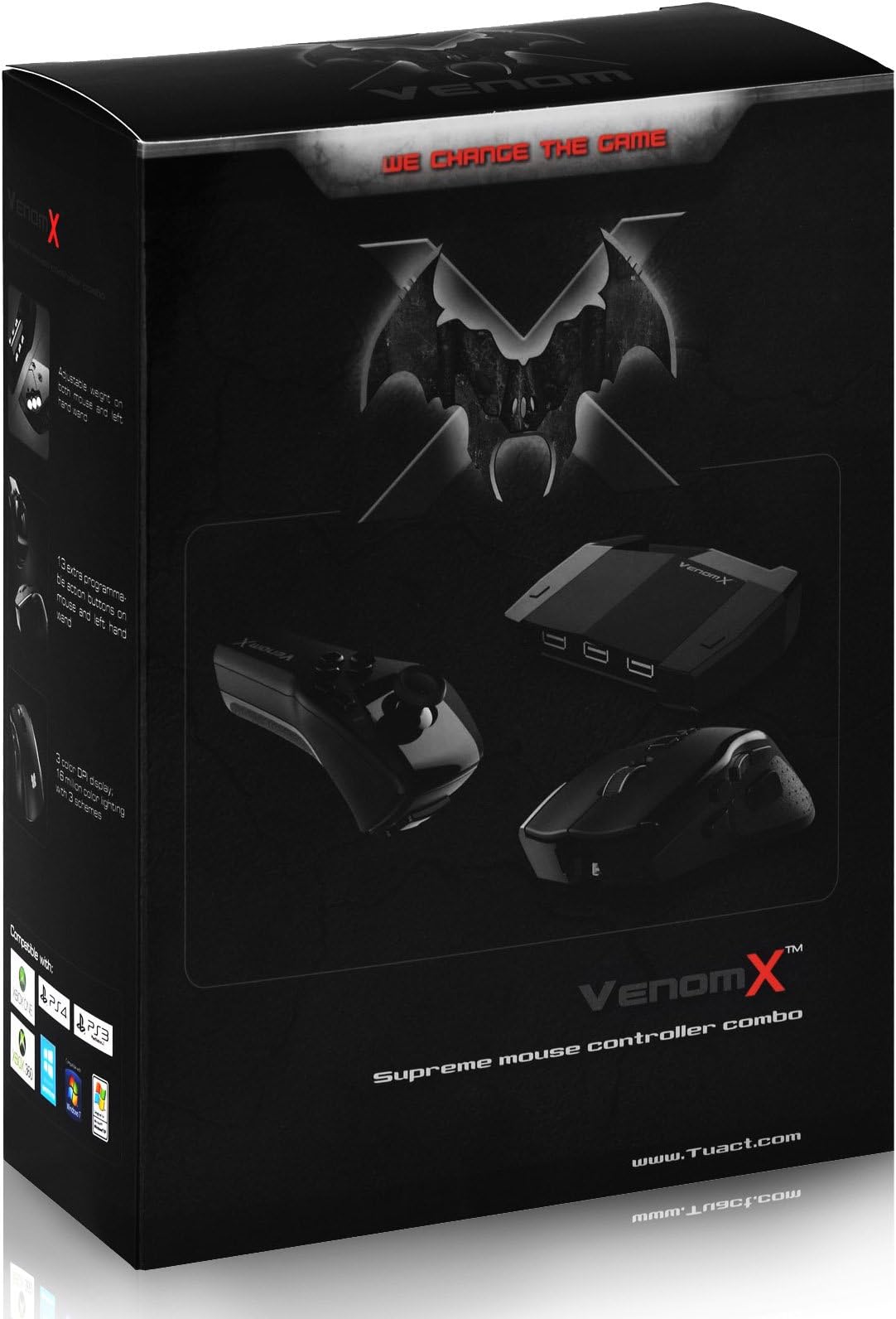




Tuact Venom X Plus Supreme FPS Mouse Controller Combo
Product ID: 7697434
Details
- BrandATOPAL
- Compatible DevicesJuego
- Special FeatureErgonomic
- Number of Buttons6
- Item Weight1.5 Pounds
Review: What a great experience - I basically bought this one for my PS4. I hate playing shooters with controllers as I am used to mouse and keyboard thats why I avoided playing these games on consols yet. I decided to give this little tool a chance as I could get it for a good price. Setting it up is easy peasy and there is enought information about how to set it up available online. You really want to check some of the youtube howtos here. Mouse and "Nunchuck" are a little bigger than expected but this does not affect the awesome game experience. When I used it first to play FarCry4 I was not fully pleased as there was a slight lack I could not get fixed by changing the settings. However as FarCry4 works great with the controller for me it was not a bad thing (I did not primarily buy the Venom X for this game). When I played Wolfenstein and Battlefield 4 with the Venom X I noticed its full potential as these shooters are basically not aim assisted. There was no lack at all and it felt like playing with the standard devices of a computer. I did not really change the Venom X standard settings for these games (just increased the mouse sens). Setting the Venom X up for these games took me less than 2 minutes. Just a note: You can connect and disconnect the Venom X to your console at any time. There is no need to restart or turn it off. Review: great mouse for FPS on PS4. - This thing worked better than expected. I've owned several tuact and splitfish products and have come to really appreciate these products. I used aimon for a while and had a few problems with Bluetooth dropouts and pairing issues with frequency interference. Needless to say, I kind of expected to like this product but also to have issues. I can honestly say I am beyond satisfied. Its a solid product. The setup and software can be a bit confusing and depending on the game, the mouse needs tweaking, but with patience and experimentation the perfect setting can be achieved. The dead zone and DPI options are noticeably different and serve to fit into the individual user's preference. I love it. The only suggestion I would make is to have a smaller mouse if possible. It may be that the improved wireless interaction requires a bigger mouse, but in my opinion, the Aimon ps mouse was the perfect size. Other than that, a five star product.
| ASIN | B00MLXZGNK |
| Additional Features | Ergonomic |
| Brand | ATOPAL |
| Brand Name | ATOPAL |
| Button Quantity | 6 |
| Compatible Devices | Juego |
| Customer Reviews | 3.8 out of 5 stars 113 Reviews |
| Hardware Platform | Xbox 360 |
| Item Package Quantity | 1 |
| Item Weight | 1.5 Pounds |
| Manufacturer Part Number | VENOM-X V3 |
| Model Number | ps4-010027 |
| Number of Buttons | 6 |
| Package Quantity | 1 |
| Special Feature | Ergonomic |
L**R
What a great experience
I basically bought this one for my PS4. I hate playing shooters with controllers as I am used to mouse and keyboard thats why I avoided playing these games on consols yet. I decided to give this little tool a chance as I could get it for a good price. Setting it up is easy peasy and there is enought information about how to set it up available online. You really want to check some of the youtube howtos here. Mouse and "Nunchuck" are a little bigger than expected but this does not affect the awesome game experience. When I used it first to play FarCry4 I was not fully pleased as there was a slight lack I could not get fixed by changing the settings. However as FarCry4 works great with the controller for me it was not a bad thing (I did not primarily buy the Venom X for this game). When I played Wolfenstein and Battlefield 4 with the Venom X I noticed its full potential as these shooters are basically not aim assisted. There was no lack at all and it felt like playing with the standard devices of a computer. I did not really change the Venom X standard settings for these games (just increased the mouse sens). Setting the Venom X up for these games took me less than 2 minutes. Just a note: You can connect and disconnect the Venom X to your console at any time. There is no need to restart or turn it off.
O**D
great mouse for FPS on PS4.
This thing worked better than expected. I've owned several tuact and splitfish products and have come to really appreciate these products. I used aimon for a while and had a few problems with Bluetooth dropouts and pairing issues with frequency interference. Needless to say, I kind of expected to like this product but also to have issues. I can honestly say I am beyond satisfied. Its a solid product. The setup and software can be a bit confusing and depending on the game, the mouse needs tweaking, but with patience and experimentation the perfect setting can be achieved. The dead zone and DPI options are noticeably different and serve to fit into the individual user's preference. I love it. The only suggestion I would make is to have a smaller mouse if possible. It may be that the improved wireless interaction requires a bigger mouse, but in my opinion, the Aimon ps mouse was the perfect size. Other than that, a five star product.
G**I
The ability to add a PC mouse and keyboard and map the commands is nice with a few extras such as turbo and sensitivity ...
The seller shipped immediately. The product works as expected for this type of product. The ability to add a PC mouse and keyboard and map the commands is nice with a few extras such as turbo and sensitivity tweaking. Overall this is a good product. The only drawbacks are the limited functionality of the console. Commands are very limited within the game software so you don't have a full range of button mapping. Also, the analog inputs for the joysticks are hard bound to the mouse's X/Y Axis. Also, the requirement to remove the device from the console, flip a switch and, plug it into the pc, then load software, and THEN begin mapping commands. Once, you are done you have to flip the switch, plug it out of the pc, then back into the console. It's a ton of work to get this thing working properly. In the end, I regret not getting the XIM4. The XIM4 It's simply a better button mapping interface through smart phone than the Venom X. Not to mention adjusting sensitivity is just as tedious on the Venom X. One consolation for the Venom X is the joystick/chuck which comes with it. It's nice to have for those more comfortable with a joystick for the left hand. If you prefer a console over the PC, but still like the mouse feel, this product finishes as a strong #2 option.
D**Y
Nice when it works, but not for long. It's a money pit.
It's nice when it works, but not for long. My first 2 Venom-X controllers each lasted about 6 months (weekend gaming). My 3rd was defective on arrival (due to manufacturing defects). The Venom-X gets 1 star, due to: (1) poor quality (made in China); (2) poor quality control (shipping defective units); (3) poor customer support (Tuact's Venom-X forum moderator "Skrilla" is corrupt and deceitful, if I'm being generous); (4) Tuact's idiotic business model, in which the sellers are responsible for handling warranty claims (authorized sellers can simply refuse to honor your warranty, as I discovered with "MonsterPrintz"). ... It's a part-time job, swapping parts, trying to maintain 1 working unit from my pile of Venom-X junk. The Venom-X is a money pit. To get a replacement silicone button-pad from Tuact, worth maybe $1 and weighing less than 1 g. (0.035 oz.), they quoted US$25.00 for the shipping alone (China to USA). Be careful with do-it-yourself repairs, which will void the warranty; if you break something, you'll pay dearly for it. ... The wand and mouse tend to fail a lot, but if you replace the wand with a keyboard (which I refuse to do), and if you replace the Venom-X mouse with a decent gaming mouse, then you might be OK (by using only the Venom-X transceiver box). The fewer Venom-X components you have, the more reliable your controller will be. ... My advice to Tuact: Make the wand more robust and sell replacement wands separately (on Amazon). In your Venom-X forum, get rid of Skrilla, he's ruining your company from within. Regarding the warranty, change your idiotic business model to get the sellers out of the loop. Sell replacement parts (e.g. button-pads) on Amazon, like other manufacturers already do, so we don't have to pay $25 to ship a small piece of rubber from China whenever something breaks.
B**N
the nunchuck thing paired with the mouse is just perfect, I haven't noticed any lag in the signal ...
This works exactly as I hoped, the nunchuck thing paired with the mouse is just perfect, I haven't noticed any lag in the signal but I'm no professional. The remotes are totally wireless (wired is optional) and the receiver sits about 3 meters away from the remotes where I sit and I still get no lag. Set up was easy, playing first person shooters is great with the nunchuck and mouse, it's an easy transition from controller to this setup.
B**D
It works well - I'm on my 3rd one
Revised as of 11/28/16. I am downgrading to two stars. Much as the last two, this third one is now starting to have issues with the L3 (stick depression). I am going to purchase a XIM and combine that with a PS Move wand. I'll post a review there to let the community know if this set up works. Previous - 3 star review below. It works, and works well enough that for COD its all I use. If you game on the PC and are looking for a cross over device to let you compete on the PS4/XBOX, then this is the way to go. I have just now ordered my 3rd one. The first two I’ve had to retire due to button issues. I ordered number two in February, so I’m getting about 8 months out of them. With both of them the buttons will get “squishy” as they are not spring enabled. The buttons are enabled underneath by rubber pop ups. These will wear out. Over time with both, the L3 and or the (stick) starts to “grind” and then eventually will not engage (it will move you) but you won’t be able to depress it to engage the run mode. Inside the wand there is a small multidirectional control box that eventually wears out. At this point I have spent roughly $400 on these controllers, so, why am I ordering my third? The answer is simple, it works well enough, and right now it’s the only plug and play mouse wand combo controller on the market in the US. (Splitfish does not sell its product here yet). If you are in the US and this is the type of controller you are looking, your options are limited. Expect to order spare parts and work on it as needed. You will need a (mini screw driver set). If you have ever worked on a PC then you should be okay.
J**I
Great Product! IMPORTANT: If you're an online gamer, read the bottom paragraph.
I love this thing however the not able to use a mic connected to the controller (PS4) but I've heard Xbox1 players say the same, other than that I would give it a 5 star rating. The mouse is a little bulky for my taste but it's light weight which helps a lot, the wand controller is similar to the Wii controller, gotta say it's pretty well made. Gaming is 1:1 ratio meaning Venom X has no lag from mouse/ wand to console, awesome hardware. The software is easy to use, it's a bit of a nuisance to switch between console to PC to tweak your settings, but it's worth it. TO ONLINE GAMERS: One precaution is regarding online gaming, Sony does not consider using a mouse as cheating but server engines such as Fair Fight might kick you out of a ranked game for having an "advantage" over other players. Fair Fight usually only monitors RANKED matches, CASUAL (non-RANKED)/ Story Mode are usually not monitored. Fair Fight is used by companies such as Ubisoft, EA, Crytek, and others; Fair Fight has permanently banned players in the past but there is no clear understanding if its just hackers, glitch abusers, or mouse users, so just be cautious when playing online.
M**8
Best available for Xbox One and PS4 as of June 2015.
This is by far the best controller mod device available for the price. Online forum support is a little rusty but getting better every day. You'll need to read through them thoroughly to get the most out of this set up. Build quality is cheap, so be prepared. I dumped the mouse quickly and went with a Logitech g502. The wand can do something very interesting and you'll want to return it. After a while, you'll notice that drifting starts to occur (you move in-game, yet you are not touching the wand). Please know that you can re-calibrate dead center. Look at their online forums for the simple video that shows you how to do it. This is something Microsoft doesn't even have. Their controller sticks drift and they have no way to re-calibrate - go figure. I use this on an Xbox One and PS4. Keeping my eye on European competitor "Splitfish" to see if they can top this. They seem to be much better at build quality and ergonomics. Some may like Xim4 over this and I can understand that. The reason I like Tuact's product is that it's pretty much plug-and-play and you don't have to configure that much stuff. You will need a PC to set it up initially or when you want to make changes.
Trustpilot
1 week ago
2 weeks ago