Desertcart purchases this item on your behalf and handles shipping, customs, and support to Mexico.
🎛️ Elevate your mix game with touch-sensitive precision and pro-level control!
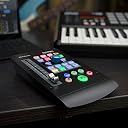
The PreSonus V2 Single Touch-sensitive Faderport is a compact, motorized MIDI controller featuring a 100mm long-throw touch-sensitive fader, a 360-degree push-button encoder, and dedicated transport controls. Compatible with PC, Mac, and mobile platforms via USB 2.0, it streamlines digital audio workstation workflows, making it a top choice for professional and aspiring music producers alike.


| Asin | B07FWF3GR2 |
| Best Sellers Rank | #33,411 in Musical Instruments (See Top 100 in Musical Instruments) #2 in Digital Audio Workstation Sets |
| Brand Name | PreSonus |
| Compatible Devices | Laptop |
| Connectivity Technology | USB |
| Connector Type | USB |
| Control Method | Touch |
| Control Type | Fader Controller |
| Customer Reviews | 4.4 4.4 out of 5 stars (618) 4.4 out of 5 stars |
| Global Trade Identification Number | 00673454006920 |
| Hardware Interface | USB 2.0 |
| Hardware Platform | PC/Mac |
| Human Interface Input | Buttons, Dial |
| Instrument | multiple instruments or any MIDI-compatible instrument |
| Instrument Key | Any |
| Item Type Name | MIDI Interfaces |
| Item Weight | 1 Pounds |
| Manufacturer | Presonus |
| Manufacturer Part Number | FADERPORT V2 |
| Mixer Channel Quantity | 1 |
| Model Name | Faderport V2 |
| Model Number | Faderport V2 |
| Noise Control | None |
| Number Of Items | 1 |
| Platform | Android, Windows 10, iOS |
| Special Features | Touch Sensitive Fader |
| Supported Software | Studio One |
| Total Usb 2 0 Ports | 1 |
| Upc | 673454006920 |
User
Control Surface for DAW
Good product
User
良い買い物をしました!
大満足!
User
Excellent DAW Controller
This controller comes with Studio One Pro, and the motorized fader works perfectly for automation control. The included software alone makes this a worthwhile purchase. While there are occasional connection issues, solutions are readily available on YouTube, making them easy to resolve. Making and editing music with Studio One Pro is an excellent experience, and I highly recommend it.
User
Great Controller for Studio 1
Great for controlling Studio 1. I don't use any other DAW so I cannot comment.Works amazing!
User
Gran adición al equipo de producción personal
Excelente calidad de construcción y muy útil para producir, hay soporte para prácticamente cualquier DAW pero hay q configurar si no es la nativa de Presonus. Se acostumbra uno muy rápido
User
It's a "nice to have", not a "must have"
1 year later review:I was very excited when i bought this. The reality of it is a bit more boring though.I found that i don't use any of the functions on it other than play/stop, and sometimes the fader for recording automation live on the fly (i.e. volume riding, reverb throws etc).I will also occasionally use the knob on "link" mode, so that when i click on the knob of a plugin i can turn the physical knob on the Faderport and it will then move the knob on the plugin. Very cool.I liked the workflow of using a physical knob so much that i went out and bought a microsoft surface dial to use for that purpose instead (with a 3rd party software called Elephant so you can use it in DAWs). The knob on the Faderport has a stepped action to it, which is fine but it's not geared towards very subtle adjustments. The microsoft dial is way smoother and the build quality is better. And with Elephant you just need to hover the mouse over the knob, instead of clicking on the knob like with the Faderport. The faderport knob is still cool though.(Note: you can hover the mouse over the knob with PRESONUS plugins, but for 3rd party plugins you've gotta click on the knob before turning. I found that the extra click added a layer of resistance to my flow)Since most of the other functions are only activated behind pressing a 'function' button or a 'shift' button, i never really acquired the desire to use them. It's not advantageous or even that enjoyable to use any of the functions that are behind the 'function' button. It's quicker with the keyboard and mouse.So in that sense the Faderport is kind of a glorified play button with motorized fader.The build quality of the fader wasn't as good as i was expecting either. It's not bad, it's fine, but it does feel a little cheap & light. I was expecting top-tier robust. The fader has a bit of play/give to it, meaning it's ever-so slightly loose. It's not *very* loose, but just a slight amount to where it doesn't feel particularly sturdy. It's juuuuust loose enough to stop you from feeling like you have ULTIMATE control over it.That said, it's still very usable, and nice enough to enjoy it.The metal casing is appreciated, and the rubber buttons feel nice to me too.It's a cool device, and looks good on my desk, but if i were to turn back time i probably would've gotten the Behringer X-Touch One instead. I hear the fader is better build quality (no give/play), and it has a scrub wheel, and the buttons are all laid out in front of you rather than having to push function or shift to beforehand. I'm more of a "visual memory" guy than a "text memory" guy so that would suit me better.The reason i chose the Faderport instead is because i'm a Studio One user and i figured the integration would be better. But i'm not using any of the StudioOne-specific functions anyway.Regardless, no major regrets.I think if you are thinking of buying this, it's really only worth it if you commit yourself to consciously integrating the function buttons into your muscle memory and workflow. Cos keyboard shortcuts and mouse already cover a lot of what the Faderport does. The single fader is VERY handy for automating, but not necessarily for mixing. Are you really gonna push the "next track" button x8 times to get to the bass track and then "previous track" x5 times to get to the kick and alter the levels that way? You might as well click on track 8 with one mouse click.In that sense, mixing with the 1-fader Faderport is kind of a fantasy.For that reason, i regard the Faderport as an "automation controller" instead.So if you're someone that mixes professionally and you find yourself doing a lot of automation, then the value of this device is absolutely optimized for someone like you. Being able to PERFORM automation into the DAW can really allow you to add more feel into your mixes. In that scenario, the Faderport is definitely worth it.If you're not someone that's doing a lot of automation, then you're spending $300 AUD on physical transport control buttons. (which most midi keyboards have anyway)I considered giving it 3 stars, but gave it 4 cos at the end of the day it IS a nice bit of kit. Well made etc. But the buyer has gotta stop and think realistically about how they're gonna use it before buying
Trustpilot
2 weeks ago
1 month ago