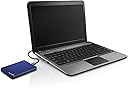
💼 Backup like a boss — secure, sleek, and social-ready!
The Seagate STDR1000102 1TB External Hard Drive combines a stylish blue, ultra-portable design with powerful 1TB storage and USB 3.0 speed. Mac OS and Time Machine compatibility make it plug-and-play for professionals, while integrated social media backup features keep your digital life effortlessly synced and shareable.


| ASIN | B00H4XH586 |
| Box Contents | Backup Plus Slim Portable Drive, 18 inch USB 3.0 Cable, Quick Start Guide, Seagate Dashboard Backup Software,NTFS Driver for Mac |
| Brand | Seagate |
| Brand Name | Seagate |
| Cache Memory Installed Size | 1 |
| Color | blue |
| Compatible Devices | Laptop |
| Connectivity Technology | USB |
| Customer Reviews | 4.5 out of 5 stars 1,715 Reviews |
| Data Transfer Rate | 5000 Megabits Per Second |
| Digital Storage Capacity | 1 TB |
| Enclosure Material | plastic |
| Form Factor | Portable |
| Global Trade Identification Number | 00763649052846, 00767261199279 |
| Hard Disk Form Factor | 2.5 Inches |
| Hard-Drive Size | 1 TB |
| Hardware Connectivity | USB 3.0 |
| Hardware Platform | Mac |
| Installation Type | External Hard Drive |
| Item Weight | 0.33 Pounds |
| Manufacturer | SEAGATE |
| Manufacturer Part Number | STDR1000102 |
| Model Name | Segate Backup Plus Slim |
| Model Number | STDR1000102 |
| Network Connectivity Technology | USB |
| Product Features | Password Protection |
| Special Feature | Password Protection |
| Specific Uses For Product | Personal |
| UPC | 803982815491 767261199279 667562770057 763649052846 |
D**N
Wait and see
I purchased this drive for backup purposes. It was not my first choice, because a Seagate 1TB internal 3.5 hard drive recently failed on me. Both Western Digital and Seagate internal hard drives have failed in my system recently, so I was hesitant to purchase either brand. However, my first choice drive, the 1TB Toshiba Canvio which I purchased in August 2015, failed within a month. The replacement Toshiba Canvio 1TB also failed within two weeks. I will update this review if this drive fails inside the warranty period. Background information for anyone interested. I have been building and upgrading personal computers for 20 years. I have used many hard drives, from 5MB to recent 5TB models from a dozen manufacturers. Over the years, several of these drives have failed. My usual procedure is to destroy the drive or just store it until the information is no longer relevant. Recently, I retired 5 drives which were 5 to 8 years old, but still working. I purchased mostly 1TB replacement drives to increase my storage capacity. However, the newer drives have failed at an alarming rate. I copied my laptop backup files from an older 500GB Toshiba Canvio to a new 1TB Canvio. This drive failed under light use in less than a month. When I attempted to zero the data on the drive to return it for replacement, all attempts with multiple programs failed due to drive errors. I was forced to return the drive with the data intact for replacement. The replacement drive failed within 2 weeks and I returned it also. Now, to keep my data from being compromised if the drive should fail, I use whole drive encryption. While a little inconvenient, it gives me peace of mind to know that my data cannot be retrieved should I have to return the drive under warranty. I also am using a dual backup system for my laptop, with two USB 3.0 1TB hard drives in rotation. These two drives are from different manufacturers, to spread the risk of single drive failures. Periodically, I copy the contents of these portable drives to my main 5TB backup and various other drives, including a NAS server. I have no desire to put all of my data in the cloud, because of security concerns. I insist on keeping physical control of my data, which is why I have adopted these practices. With the cost per terabyte of storage in the $50 range, this system is not expensive for my needs.
J**T
Great Size, but difficult set up and slow backup speed
I have a very old computer full of pics and music that I want to get rid of, so I ordered this for data backup. I'm giving this three stars for the following reasons: 1) Set up. It's not super clear. You plug into your computer, open up the drive, and click an icon labeled "Seagate Set-up". Easy enough! That takes you to a webpage where you have a few options. Also easy. Then you register your product. Easy! Then .... you can't get back to the first page. The one that says "Backup", which is why, you know, you bought the product in the first place. Ok, close the window, click on the icon again, this time clicking "Backup". Ok, you have to download more software. Ok, downloaded. Click on installer. Now you have to reboot. Now you have to add more software and reboot again. 2) You're now set up! You launch the Desktop and click "Backup" and it starts backing up EVERYTHING. In my case, I only wanted to back up some music/pics, so I paused that, clicked on help, and found out how to select specific folders. Awesome. Except that ... you can't get out of the "Help" section. There's no "x" button, hitting escape didn't work, right clicking on the program in the task bar does nothing - I had to launch Task Manager and close it from there. 3) Ok, so now you only want to backup certain folders. You can choose from your "Computer" and ... no where else, like say, your desktop. I expanded every menu and was not able to find "Desktop" as an option, so I had to move all of my folders to "My Documents" in order for the back up to find it. 4) I don't know if it's my old computer or the drive itself, but it's been over an hour, and it's still not done. Yes, I have quite a bit of music/pics/videos which are large files, but I moved all of these files bit by bit to a new laptop via flash drive and it didn't take NEARLY as long to copy over files. (yeah - I'm a little paranoid about data. I'm also uploading everything to the cloud.) That all being said, it's compact, it's a GREAT price for a TB of storage, the blue color is cute, and you get 200gb of free cloud storage for 2 years with purchase, so that's awesome. It's just a little clunky to get started.
T**.
Works Well for my Mac!
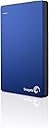
This one is "Plug and Play", as they say... it just works, and that is great! One thing to know: you cannot use a USB Hub port to connect this - it has to plug directly into your laptop/computer's USB port. This was challenging for my USB-limited MacBook Air (only 3 available), but I now use a USB Hub for other things (including my bluetooth keyboard and trackpad, external DVD/CDRoM drive), so its working out fine. The user-interface is fairly intuitive, backing up every hour or so. However, after a few days of backups, it only saves one per day, which is not necessarily the "last" backup of that day (one is from 3:21pm of that day, next is from 12:02pm the next day, then the following day saved the 1:58pm backup, etc...) So, I'm not sure about why it is set up that way, but I haven't tried to get Seagate's help with it, yet. Restoring from a backup is extremely easy, when coached how to do it the first time by my wonderful AppleCare phone support :-) The metal box (it feels like metal, anyway) seems pretty sturdy, but I am not one to lug it around with me. If I ever do need to take it "on the road", its size is beautifully compact and lightweight - well done design! Plus, the one I purchased is a very pretty blue, if colors matter to you. The price point was lower on this than the other color options, so that's what made my decision easy!
L**C
Très bon produit
Fonctionne très bien, la marque Seagate on se trompe pas, il fonctionne toujours bien, il marche pas car il a pas de patte lol excusé la
J**W
Excellent Product
I've owned this product since January, 2017. I have intentionally not written a review until now so I could have adequate time to use the product and make a fair assessment. To date the Seagate Backup Plus has performed admirably. It is an excellent product and performs exactly as advertised. I have not used it to back up any mobile devices. I've owned a Lenovo T410 laptop since 2011 and have been running Windows 10 for a little over a year. I've used this external hard drive many times to do backups. The process is scary easy. In general I backup File History which is really loaded up since my laptop is so old. In addition, the backups include my 10K song iTunes library, numerous movies, and many videos. I have done a couple of System Images as well. At present I have more than 900 GB (of the 1 TB) of unused space remaining. I'm hardly an expert on external hard drives but that seems pretty awesome, particularly for such a reasonably priced unit that also happens to be light as a feather. One of the things I noticed in reading external hard drive reviews prior to my purchase is the large number of reviewers who complain about their drives breaking down. So I guess the final quality assessment may not be possible until I've owned the drive longer. Hope this helps someone with their decision making process. This was an authentic purchase and I was not part of any promotional program.
Trustpilot
1 month ago
5 days ago