
DOWNLOAD THE APP


Customer Services
Copyright © 2025 Desertcart Holdings Limited
DOWNLOAD THE APP

🔥 Versa H21: The budget powerhouse that keeps your build cool and connected!
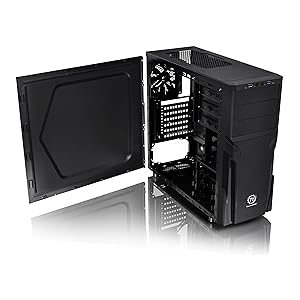
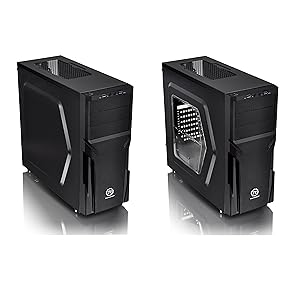
The Thermaltake Versa H21 is a robust SPCC ATX Mid Tower chassis designed for gamers and PC builders seeking efficient cooling and versatile hardware support. Featuring perforated mesh panels for superior airflow, front USB 3.0/2.0 ports, and tool-free installation, it accommodates ATX, Micro ATX, and Mini ITX motherboards with ample space for long GPUs and tall CPU coolers. Its advanced cable management and dust filters ensure a clean, optimized build environment, making it a top choice for budget-conscious professionals who demand performance and reliability.








| ASIN | B00J0NZ3Q4 |
| Audio-out Ports (#) | 1 |
| Best Sellers Rank | #52 in Computer Cases |
| Brand | Thermaltake |
| Color | Black |
| Customer Reviews | 4.3 4.3 out of 5 stars (715) |
| Date First Available | March 15, 2014 |
| Department | cases |
| Is Discontinued By Manufacturer | No |
| Item Dimensions LxWxH | 18.7 x 8.2 x 16.9 inches |
| Item Weight | 9.3 pounds |
| Item model number | CA-1B2-00M1NN-00 |
| Manufacturer | Thermaltake USA Direct |
| Number of USB 2.0 Ports | 1 |
| Number of USB 3.0 Ports | 1 |
| Product Dimensions | 18.7 x 8.2 x 16.9 inches |
| Series | Versa H21 |
A**R
Excellent Budget Case
Pros: By far the best budget case I've ever tried. Case layout is well thought out, all the features work (in the past budget cases would have features that looked correct but didn't function, all the features on this case are functional), front io panel is simple and useful, there's enough room for cable management in the back. The metal is thin but strong enough to do the job. The drive bays are easy to use and work great. Cons: The front cover is difficult to take off which makes installing/cleaning front fans difficult, the rear expansion slot covers are difficult to remove, the PSU dust cover is kinda finicky, the included fan is pretty cheap/loud, one of the amazon pictures shows a side window, which this does not have. Overall: Great case for the $$, obviously if you spend more you'll get more. All the essentials are executed correctly on this case, would buy again.
P**R
Excellent case with plenty drive bays
I have built quite a few computers over the years. But I tend to gravitate towards inexpensive models because I have lots of left-over used parts. This case is very easy to work with, which will be configured as a NAS/server. So, room for drive bays is extremely important. Offerings nowadays tend to gear towards gaming with few or even no drive bays. For example, my main computer does not have a single drive bay. The need for a NAS is pretty clear. This case does not really have any fancy features. Fit and finish is fine, but do not buy it for look. Anyone with just a little bit of experience in putting together a computer can complete the installation in about an hour or two. The only item that requires some thinking is routing the wires and cables, but that should not take that much time even if you had to redo some. There is plenty of room inside, so air flow is very decent. I have no idea if you install a big/long video card; I am using it as a headless device, so no need for discrete video card. The only complaint I have is that the case only came with one fan in the back. I would have appreciated if a couple more fans are pre-installed on the top. But that is still only a minor issue. Overall, I am satisfied. Then factored in the cost, I think it is a very deal. Highly recommended.
S**T
The Good, The Bad, The Ugly
The good is pretty generous for such an affordable case. Great ventilation, tons of drive bays, tooless 5.25 bays, power/reset switches nicely placed on the top for easy access. The bad is more annoying than anything else. The board uses standoffs for ATX boards built into the motherboard tray area. If you use a Micro ATX motherboard, you have to use two screw-in standoffs on the side closest to the PSU. Which is fine, however, they use fine thread screws where the native standoffs are course. Really Thermaltake? In my case I started with the fine thread screws first, because I thought the others followed suit. Obviously, I was wrong, and now I have a MB screw in the corner of the I/O ports, CPU power plug that won't tighten, or backout. That will be interesting when I have to remove the board. You can't pull the out of the I/O plate due to the screw, and you can't lift the screw out due to a very tight corner, which is coming in the next section. Now for the ugly... There is almost zero space in the corner side of the CPU for cable management or access to screws, and the CPU power plug, especially if you have a high tower cooling fan like myself. I already told you about the one corner screw, but the one next to the memory is tucked under the latches locking the ram in place. Even without a tower cooling system it is very tedious. The takeaway is that the case is pretty good for the price no doubt. Fantastic cooling, tons of easy to remove drive bays (my personal favorite), and easy access to everything other than devil's corner that I shared with you above. All in all, I recommend it. Just be aware it has some quirks and with that knowledge, you will have a bargain case that does 90% right.
T**W
Great Case
Doesn't break the bank. Up to 3 external bays - cases with those are getting hard to find for a decent price. 2 x 120mm fans snap into the removable front screen behind the front cover. Front cover comes off without any wires attached. Doesn't require any screw in stand-offs, made into the case. Comes with 3 stand-offs in case you have a extra wide motherboard - there are holes for them but it's rare you come across a board that needs them. The other stands are made into the case, but will strip easy if you tend to over tighten mounting screws- but not a big deal. You can always use a differently threaded screw if needed. Can fit 2 120mm fans into the top, but it's tight. Most CPU air coolers fit, as well as most video cards - but a long card might not fit depending on what you have in the external bays. No clear sides or windows if you want a "pretty" hardware installation but great for those that just want a functional case. Might have to get inventive if you want to use water cooling.
B**T
Nice roomy budget case
Happy with this case. Good quality with a nice finish and accurate openings, etc. Connectors labeled nicely. My only negative observation is that the included fan seems a little cheap and is a 3-pin design. Yes it should work on a 4-pin connector but you'll lose some functionality. Otherwise, a great budget case.
B**Z
I have just returned after a long term overseas contract and to save weight I left my Thermaltake Elements G case behind and just bought the mobo home to make a storage PC. The case is so cheap I thought I had been sent a Chinese no-brand case. Flimsy metal, cheap plastic HDD trays when we should be moving away from such materials, once you remove the rear close-outs and the 5.25 optical bay closures - you will never get them to fit back in as the tin foil metal bends irreparably. Also the numerous sharp edges from breaking out said closures cut your hand with annoying regularity. God how I wish I had bought mt Elements G case home - it was everything that this one is not. Buy a different brand as Thermaltake are no longer a quality manufacturer. If I could give this 0 stars, I would.
C**U
Gabinete de muy buenas características, lo que buscaba a parte de poder recibir una tarjeta ATX es que puedo utilizar también las bahías de 5.25
T**R
Nice basic case and good room but be some what beter for cable management
R**N
do,not use motherboard pins on this case. screw it in the case. use the black screws that come with it. it will fit . nice case.
L**I
First impression? boy things are getting cheap. Built a computer 12 years ago and thought the case was cheap then, well its far more solid than what's made today. Too much flimsy plastic in this one that wont last.You'll probably have to spend twice the price of this one to find a solid unit. Sorry not that impressed ,hence the generous 4 stars
Trustpilot
3 weeks ago
2 days ago