🚀 Upgrade your workflow with Windows 7 Home Premium — speed, security, and style in one sleek package!
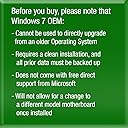
Microsoft Windows 7 Home Premium SP1 64bit OEM DVD offers a robust, 64-bit operating system designed for fast startup and smooth multitasking. This OEM version includes a unique 25-digit product key for secure activation and comes in eco-friendly, frustration-free packaging. While it requires a clean install and lacks direct Microsoft support, it provides a reliable foundation with eligibility for a free Windows 10 upgrade, making it a smart choice for professionals seeking performance and future-proofing.
| ASIN | B00H09BB16 |
| Customer Reviews | 4.4 4.4 out of 5 stars (2,769) |
| Date First Available | May 18, 2012 |
| Item model number | GFC-02733 |
| Language | English |
| Manufacturer | Microsoft |
| Product Dimensions | 1 x 1 x 1 inches; 1.6 ounces |
G**E
Turned an old XP computer into a new one!
With Microsoft ending its support of XP on April 8th, I knew I had to do something about one of our older Dell computers that's been running XP for the last -- wow maybe 8 years? A little voice told me I should just spend $400 on a new computer instead of $100 on a new OS but the old computer works fine and was pretty fast on XP, and the Windows Upgrade Advisor (free download, google it) told me that the unit would have no problems with Windows 7. So I copied all of my picture and document files off of the computer onto an external hard drive and booted this DVD. It only took about 10 minutes to install Windows 7 and yes, the hardest part is reading the micro type on the password key to unlock the copy of Windows. I took a picture with my iPhone and then zoomed in to read the numbers but even with that one number was VERY hard to read. After activation I spent the next hour or so configuring the computer, and I used Windows Easy Transfer (another free program from Microsoft) to move all the files over. Windows 7 is a great OS -- I didn't want to mess around with Windows 8.1 .... this disk is only usable on ONE computer and once you use the key there, it is forever locked to that computer's motherboard, so don't think you can install this on all the computers in your house. For me this was easier than going through the hassle of ordering a new computer but I might regret that decision down the road since I just dropped $100 onto a pretty old computer.... but for now I'm very happy with how Windows 7 is performing and how easy it was to install on my old computer.
W**Z
Quality Gaming PC!
Finally finished piecing together my new PC and gave it some time to test it out. Most of my decision making was the result of reviews from here (Amazon) and forums on tomshardware.com. -NZXT Guardian 921 RB ATX Mid Tower Case, Black 921RB-001-BL -Intel Core i5-3570K -Windows 7 Home Premium 64bit -EVGA GeForce GTX760 SuperClocked w/ACX Cooler (02G-P4-2765-KR) -Corsair Vengeance Blue 8GB (2x4 GB) (CMZ8GX3M2A1600C9B) -Gigabyte Intel Z77 LGA 1155 (GA-Z77X-UD3H) -OCZ Technology Fatal1ty 750W (OCZ-FTY750W) -Intel RTS2011LC Liquid-Cooling Kit -Samsung 840 SSD 500GB (MZ-7TD500BW) -D-Link AirPlus DWL-G520 Wireless PCI Adapter(rev.B) Boot up is less than 10 seconds from power button to login. At resolution 1920x1200 with most settings on high (using NVidia GeForce Experience recommendations) gameplay is smooth and pretty with Assassins Creed IV, League of Legends, Rage, Path of Exile, Diablo 3, StarCraft 2, & Heroes of the Storm. All the fans are not loud at all and go unnoticed with the box under my desk. The lights look awesome from the fans, psu, & Intel CPU cooler. The case has 3 thermometers labeled for CPU, HDD, and SYS. They make for a nice LED display on the front but placing them in the case is a little tricky. I use HWMonitor to watch temps and so far nothing has gone over 55 Celcius. Gigabyte has some proprietary software w/ their motherboard. I have attempted the auto overclocking program labeled EasyTune but have not had much luck with it. Ended up keeping CPU at it's original 3.4 GHz since there isn't really a need to push it more than that currently. In the future I may try manually overclocking in the BIOS. The BIOS is extremely easy to navigate and has a plethora of configuration options and adjustable parameters. Overall, system works flawlessly and is everything I wanted with the potential for easy upgrading in the future. Hope this helps if anyone is shopping around and doing some research.
P**1
Fantastic Upgrade from Vista......
......but you already knew that. I loaded this Windows 7 version onto a Corsair 90 GB SSD in an almost 5 year old HP DV7-1200US laptop. It runs very well, restarting (from clicking restart to being back at the desktop) in 60 seconds and booting from a completely powered down state to the desktop in about 40 (although I can't necessarily say how much of that speed is due the the SSD and how much is due to the OS itself). Regardless, I've been very pleased with its performance, in terms of both speed and smoothness of operation. Menus load almost instantaneously and programs run without the frequent hitches and hiccups of Vista. I cannot speak of nor recommend this OS highly enough. Another reviewer (user EvilOzzness who posted on the "Old Standard Packing" edition of this page for this version) seems to believe that since this is the OEM version of Win 7, once you install it onto a computer, you can never change any hardware components of the computer without breaking/locking the OS. He cites an excerpt from the EULA provided by Microsoft for OEM or "System Builder" versions of Win 7 as well as personal experience trying to replace a broken HDD as his reasoning. However, reassured by the advice of friends and other reviewers, I installed my copy and then added both a new 500 GB Western Digital HDD and 2x4GB of Samsung DDR2 RAM to my rig. This didn't seem to cause any problems. The new hardware installs occurred after official Windows activation of the OS and I never had any issues with it booting or running on any level. The review I'm referencing was written in late 2011, so maybe Microsoft altered that section of the EULA since then, or maybe EvilOzzness just interpreted the text incorrectly and his plight was due to some other unseen issue. So, if you were afraid this might happen to you, don't be (unless you need to change motherboards - OEM software should lock to motherboards, but only motherboards, not other hardware). In my experience, the fear is unwarranted.
H**9
It is also nice to have your own DVD of Windows 7
This worked very well for me. After a big computer crash I put a new hard drive in my Acer Aspire laptop. Since Fry's wanted to charge me $150.00 to reinstall Windows 7 (which I think it is a ripoff since I purchased the computer from them and had the product key # for Windows 7 listed on back of the computer) I decided to buy this for for about $50 less and not get ripped off by Fry's. It is also nice to have your own DVD of Windows 7, which places like Fry's don't include with your computer purchase anymore. It was a smooth install, like butter. The DVD is white color with black lettering on it. It says intended for distribution with a refurbished computer PC. It includes Service Pack 1 on it, which it automatically installs. It is 64 bit. It comes in a clear plastic DVD case. It has a small piece of paper inside with the product key. If you have good eyesight no problem, otherwise you will need a magnifying glass to read it. Fortunately the install never even asked for the product key, it just installed without it. Based on how well it installed with no hassles I have to give it a 5 star review. My only problem was that after ordering it took about 4 days before they shipped. Most Amazon prime ship pronto, but this took a little longer. Other than that, it was a nice purchase and I am very happy with the product.
J**D
Be Prepared
Used for a 3 yr old HP desktop. HP would NOT provide a copy of the Win 7 OS which came with it, so when we ran into issues with the system and a reload was required,,,, I had to purchase this. Pros: - its the Win 7 OS and it works. Cons: - Contains no drivers for installation. So it wouldn't even recognize the onboard network controller. I had to determine the system board and download specific drivers for the network call and install via USB. Once this was done and rebooted the system would see my network. This was a huge waste of time. - OLD version of the OS. Took several hours to download and install the massive number of updates required. The first batch was over 200 and after each required reboot, a new list of 50 or 60 patches was required. I've installed a new OS on dozens of machines,,, this one was the most labor intensive. - Disc partitioning was a nightmare. My C: drive had 3 partitions. This install provided the option to remove the partitions and reformat, but when I would, it would fail saying the drive wasn't in the correct file format. This is incorrect since the HD was formatted by Win 7 previously. In the end I solved this by by-passing a step in the menu options. This was not documented nor intuitive,,,, I'd tried everything else and just started making selections. - Finally - this is a one use option. You can't re-install on the same PC without paying MS for assistance. Which sucks. End result - its working, but it was a pain. I don't know if any other versions of Win 7 on here would be as problematic or not.
C**R
For A Good Friend..
I got this for a good friend and although I've had a system running it for a couple of years now, it still surprises me how well the OS manages to install the correct drivers and other items most of the time on an install. The system I was putting this on had had the HD removed as it was full of items that some one wanted to keep and didn't have time to copy them. I installed a new HD and, after checking out the BIOS to make sure it was seen correctly, I saved the set up and rebooted to the DVD drive and Win 7 setup began without a problem. It was a smooth installation without a single hiccup all. After it finished Win 7 came up and was very solid with no problems I could see and was very stable. I noted that Win update got all the needed drivers and installed them without any problems. It even installed updates for the card slots and allocated drive letters for USB devices. (Such as drives, etc.) I checked these and they worked great for USB flash drives. I was very happy with the total install. The only problem I ran into was with the printer drivers as I needed to use HP drivers due to the printer being an "all in one" and needed some OCR software. Win 7 and HP clashed a bit when I plugged in the printer's USB plug but I managed to stoop windows long enough for the HP software to complete installation. Overall, a very pleasant and speedily installation.
J**N
Installed on MacBook Air 2013 model OSX Mavericks
I tried installing it as a Bootcamp partition but that was a nightmare. LOTS written on forums about the problems but basically Win 7 doesn't have the drivers for USB 3.0 so it won't read the necessary files that download from Microsoft and you have to install on a USB flash drive. There are hacks that have worked for some people, including splitting the install between Bootcamp's process and a VMware Fusion trial but nothing worked for me. I've been a desktop computer techie since 1977 so I have a clue. Now the good news - a stress test of sorts. I installed this product into VMware Fusion 6 and it installed easily and works fine, for a Windows O/S. I allocated 2 cores of the Mac's i5 2 core processor and 7 GB of the Mac's 8 GB to Windows. My wife, a business intelligence analyst, was able to load a huge data file into Windows and work with Tableau and Excel for data analytics. There was plenty of RAM and processing power. She went to her Mac desktops and opened Wizard for Mac, a data analytics program, mail, and a few browser windows. All of those worked well while the Windows virtual machine was still active. We're amazed at the Mac's and Fusion's performance! I see no need for Bootcamp unless you are doing some heavy 3D computer graphics or video rendering. You should be on the MacBook Pro for that anyway, or better yet that amazing new Mac Pro!
N**S
I HATE WINDOWS 8!! (Thank the gods this is still around)
Okay, so I hate Win 8 (as you now know). I was seriously worried that this would be a PitA to install. No, really. I have installed Windows before. Besides, it says "OEM" like I am some computer manufacturer. WtH is OEM? I still don't know. What I do know is that this is the only LEGAL way to get a copy of Win 7 without having it pre-installed on a computer. I did a LOT of research before I dropped a hundred bucks on this. Even so, I was unsure. Rest easy. You get a DVD. That is it--nothing fancy. Scared yet? I was. What if it didn't work? I F-Disked my computer. Wiped **everything**. Now came the moment of truth. All I had was this DVD. Well, I popped it in and carefully followed the onscreen instructions. It took about 40 minutes I think. I had to click a lot of times for the first 5 or ten minutes. The usual stuff. Enter information (nothing hard), and the computer rebooted a few times. I was able to walk away and do things while most of this went on, and I would just walk by the computer to see if it was ready for me to type anything in. Seriously: If you are reading this page you can install Windows 7 using this DVD. The fact that you can get online and find this page on Amazon is proof that you can click and type. This was so much easier than I thought it would be--oh! oh! And you know the best part? (I swear I almost forgot). NO BLOATWARE! I know, right? No #$%^&* bloatware!!! Unlike every PC I have ever bought, I have nothing to uninstall. No special offers, no "suggested Internet services." Bah! I wish I didn't hate Win 8 so much. I would install another copy of Windows because it is so easy. I am sticking with this and also going to Mac. The new CEO of Windows has all but pronounced the PC dead. I do not expect Microsoft to make any more desktop software.Between games and tablets, they seem to want to get away from those of us who actually use keyboards. Win 7 is not as nice as NT was--(oh how I miss you NT), but it works, and it is so much less annoying than Win 8, which won't let you run your own computer (keeps telling you that you need to be an admin). Bleh! I am so glad I found this DVD. Anyway, thanks for reading this. Lemmeno if you need anything answered. I will help if i can.
C**N
Windows 7
Cumplió en su día con la misión que tenia cuando lo adquirí. ¡Es un buen producto!
M**O
Tut was es soll👍🏻
Super alles wie beschrieben Key klappte sofort und für Leute die Hilfe brauchen um Windows zu installieren gibt es dazu eine präzise Anleitung
R**F
Buy it
Not much to say. The product is exactly what it says. A genuine copy of Windows 7 home edition premium. Very simple and easy to use. Being an OEM copy this means that you don't get the CD on a pretty box, also you don't get an instruction manual but 1) you really don't need one, and 2) just write "windows 7 manual pdf" on Google and you'r done. Another (irrelevant) problem of buying an OEM copy is that you don't have access to the free support services from Microsoft. Finally, as OEM, this software will be tied to the computer of its first install. In other words, this mean that you can change all the hardware on your PC except for the motherboard. Once you change your motherboard you wont be able to reinstall. Some say that if you make a phone call to Microsoft, on some cases, they'll give you a new key but keep in mind that might not happen. But keep in mind also that, as we stand now, buy buying an OEM copy you will be saving around 100£+. So, basically, even if anything goes horribly wrong with your PC, you can buy yourself another OEM copy and still save money. Unless you are completely unfamiliar with PCs, I advise you 100% on getting one OEM copy of windows. The install is pretty straight forward and you have YouTube videos (and the whole internet) that will clarify most of your doubts batter than any support line. As for the product it self. In my opinion, Win7 is the best system since Windows XP. So go for it.
P**R
Gekauft, bekommen, installiert, läuft......
Habe Microsoft Windows 7 Home Premium bestellt und nach einem Tag erhalten. Software installiert und key eingegeben, Windows läuft problemlos. Bin total zufrieden!
N**N
Cheapest way to get Windows
I needed Windows for some work software and this was the cheapest way I could find to get it. Not a big Windows fan, but I assume anybody buying this knows what they're doing and wants to know if this is a good way to buy Windows. The answer - yes, it all works fine with no activation problems. Now runs happily on my Mac laptop via Bootcamp, although be aware you do need to make an ISO of the disc with Disc Utility to install it with Bootcamp. After a disappointing week with Windows 8 on a Microsoft Surface Pro 2, I decided to return the Surface and just use Windows 7 on the Mac to get the job done and haven't been disappointed. There are a ridiculous amount of updates to install - think 15 restarts - in the first few hours, but once you've done that it works smoothly and is a lot simpler to use than the mess that is Windows 8. For Mac users, you need AT LEAST 60GB on your Windows partition, so ignore Microsoft's claim that it only takes 20GB of disc space. It did before all the service packs, updates and with every optional component left out. If you don't allow 60GB, you'll find Bootcamp doesn't have space to install the drivers properly, and you'll waste a lot of time reinstalling. Once you do this, the Mac drivers all work perfectly and you can adjust the DPI scaling to 200% to give clear, large fonts/icons/buttons on the high resolution of a Retina Macbook Pro.
Trustpilot
2 months ago
2 weeks ago