We remain fully operational. Our teams are working around the clock to ensure your deliveries continue safely.

DOWNLOAD THE APP


Customer Services
Copyright © 2025 Desertcart Holdings Limited
DOWNLOAD THE APP
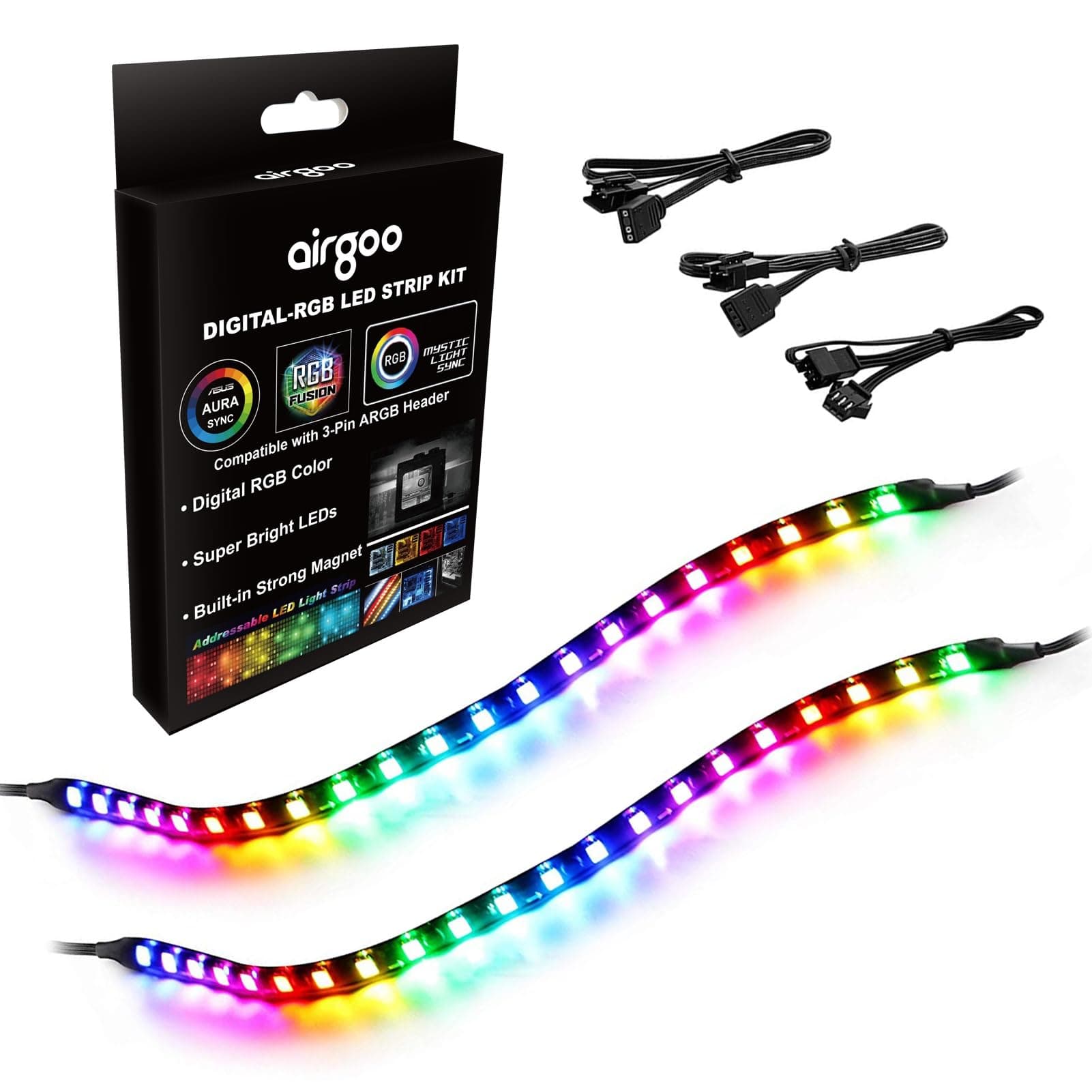
🌈 Light up your workspace, don’t let your rig blend in!
The airgoo Addressable RGB PC LED Strip features 42 individually controllable LEDs housed in a flexible, clear silicone cover. Measuring 13.78 inches, it supports 5V 3-pin ARGB headers or Airgoo’s AG-DRGB16 controller (sold separately). Installation is a breeze with built-in magnets and adhesive tape, making it ideal for gamers and professionals seeking customizable, vibrant lighting that integrates seamlessly with multi-brand ecosystems.


| ASIN | B07DPNNTHJ |
| Additional Features | Compatible with Airgoo AG-DRGB16 Signal RGB controller or motherboard's argb 3-pin header, Dimmable |
| Best Sellers Rank | #136,637 in Tools & Home Improvement ( See Top 100 in Tools & Home Improvement ) #871 in LED Strip Lights |
| Brand Name | airgoo |
| Color | Rainbow 2 Strips, Fit for 5v 3-pin, 42 LEDs |
| Connectivity Protocol | 3-Pin ARGB Header |
| Connectivity Technology | ARGB 3-pin Header |
| Control Method | Remote |
| Controller Type | 5V 3-Pin ARGB LED headers or controller |
| Customer Reviews | 4.6 4.6 out of 5 stars (2,496) |
| Included Components | 2 x Addressable LED Strip (35cm) 1 x DRGB Extension Cable A 1 x DRGB Extension Cable B 1 x 3Pin Extension Cable |
| Indoor Outdoor Usage | Indoor |
| Item Dimensions | 13.78 x 0.39 x 0.12 inches |
| Item Length | 13.78 Inches |
| Item Weight | 0.09 Kilograms |
| Light Color | Addressable RGB |
| Light Source Type | LED |
| Manufacturer | airgoo |
| Manufacturer Warranty Description | For 12 months after the date of purchase, we take care of all quality-related issues with a replacement or full refund. |
| Material Type | Copper, Plastic |
| Model Number | AMDRGB0001 |
| Number of Items | 2 |
| Number of Light Sources | 42 |
| Occasion | Gift |
| Power Source | Corded Electric |
| Product Style | Modern |
| Theme | Perfect for DIY gamers to build up any color or animation they desired. |
| Unit Count | 1.15 Feet |
| Voltage | 5 Volts |
| Water Resistance Level | Not Water Resistant |
| Wattage | 10 watts |
| Wireless Communication Technology | Bluetooth |
K**I
Easy Installation & Attractive
This is a great way to bring RGB color to your desktop rig. The magnetized light strip made it a breeze to install. The only tricky part is plugging into the motherboard. Take your time, be gentle, be patient, and don't bend the pins.
J**Y
Very good quality and brightness.
This is a good discrete kit for adding addressable LEDs. The magnets make it easy to mock up and ultimately install the strips using the self adhesive. Be aware, for a Cooler Master RGB/Fan Hub the connector on the provided aRGB interface cable was a little too wide to fit into the hole in the Hub case. This would probably not have been a problem for my motherboard directly and it was easily remedied by trimming away some of the rubber on both sides of the cable's connector using a hobby knife. For those not wanting to modify the provided cable you may want to consider using a stock Cooler Master cable and moving pins between or splicing into the "three" pin locking connector used on the strips. It looks to be of the standard RGB LED, again "three" pin. I docked one star in my review on easy of install due to this, but otherwise I am very happy with the provided parts. They are bright enough for projected light to be seen behind a smoked acrylic cover of a Cooler Master case. I have them tucked under the upper and lower lip of the case. So far the are still in place and the adhesive appeared to grab well during install. For install and size comparison, in a CM TUF Q300L the LEDs reach the entire length of the upper and lower lengths of the case. The provided interface cable and extension worked to get the strips installed and wires routed out of sight. They are working with ASUS Aura on a CM RGB/FAN Hub perfectly.
D**G
works well
works as described,bright ,flexible and well worth the $
E**.
nice ARGB/RGB lights, quesitonable cable management.
easy installation with good color accuracy and adhesive magnet quality. looks nice and isn't too sharp on the eyes. Length for me was perfect for installing on the top and sides of my pc but it has one caveat in the length department. For whatever reason, the motherboard 3 pin cable was installed onto the extension cable meaning if you use something like a fan hub that sits in the back panel / bottom of your pc area you will have to plan accordingly, if you plug it into your motherboard only though, you'll be just fine. solid quality on the magnets and lights no complaints but the end that isn't plugged into an extension does stick up so tape it down if you'd like.
J**N
Great product and great customer service.
Package arrived on Wednesday with everything listed. One strip did not work. I contacted customer service and they responded within a few hours. The following Friday (two days later) I received not a single replacement strip but a complete package. That’s great customer service! On to the product- installation is self explanatory knowing that you must install this to an addressable rgb 3-pin 5v header. Magnets are sufficient at securing the strip to a single straight run but trying to turn corners it may struggle, that’s when the adhesive helps out and holds the 90-degree turns tight. When connecting the strips in series or daisy chain, the light timings on each strip does not sync perfectly. There is a slight delay in the latter strip, maybe 1-2 second delay. In order for the timings to sync in both strips, you need them to run in parallel or use a splitter. The package does not come with a splitter, it comes with and extension. I used one of the included extra cables to make a homemade splitter and connect the led strips like that. Now both led strips sync up perfectly. Overall, I’m happy with the project and very satisfied with the customer service. The lights look great in my NZXT H1 case.
M**R
Can't daisy-chain more than 3.
I purchased a couple months ago, (https://www.amazon.com/gp/product/B07NXW4K5T) {Digital RGB PC LED Strip, Airgoo Computer Magnetic Addressable LED Strip Kit, Motherboard with 5V 3-Pin RGB Header for Asus Aura, Gigabyte RGB Fusion, MSI Mystic Light (42 LEDs, RF Controller Include)} The 2-LED-Strips were bright, and the controller worked as expected. In the "NOTES" section. * When you use the controller and the SATA cable, the led strips can Daisy Chain 4 strips and more. So, last week, I purchased (from this same page) (https://www.amazon.com/gp/product/B07DPNNTHJ) {PC Digital RGB LED Strip, 2019 New Addressable Magnetic LED Strip Light for 5V 3-Pin addressable LED headers, Compatible with ASUS Aura SYNC, Gigabyte RGB Fusion, MSI Mystic Light Sync Motherboard} And the 2-LED-strips are a lot dimmer the the first batch, and connected to the same controller.. Since the "NOTES" says "Daisy Chain 4 strips and more", I've tried that, and it does NOT work. I don't know if you can see the image clearly, the LEFT-TWO strips are the first batch, and the LEDS are bright. The RIGHT-TWO are dimmer. Also, having ALL 4 daisy-chained, if you notice, the entire LED-strip of the far left does NOT turn on at all. And the 2nd-strip from the left , 5 LEDs of the top does NOT turn on. If I connect each strip separately, to the controller, all the LEDs work, ... and if I connect two-strips, both strips all lights up. But, When I connect the 3rd strip, the LEDs stops working. I'm using the SATA cable, and controller, and NOT the motherboard. ***** UPDATE: Dec 10, 2019. (changed from 3 stars to 5) With the 4th strip not working, after thinking about the problem, I remembered when I first got the controller. I went into the "setup" (with limited instructions) and noticed that you can turn individual LEDs on/off. I turned them all back on. And, now, all 4 LED strips are working. But, I still have the issue that the last 2 I bought are dimmer than the first batch, ONLY when I have the brightness on the lowest setting. If I turn the brightness to max, then you don't notice which one is dimmer than the other. Also, with the controller, and the setup, I somehow "swapped" the red and green buttons. When I press the "green" button on the remote, the LEDs turns red, and when I press the "red" button on the remote, the LEDs turn green. The "blue" still works. I can't find info on how to reset the controller. Or, what I did to swap the buttons.
M**K
eccellente
M**D
One of the best items i buy it online and very Easy to fix 🙂👍🏼
U**1
ممتاااز
Α**Α
Je pense qu'il s'agit de "Aigoo", connue il y a quelques années pour des ventilateurs d’entrée de gamme à la qualité très discutable, car le logo, la police d'écriture est quasiment le même. Je ne vais pas tourner autour du pot : techniquement, ces bandes LED ne méritent pas 1 étoile. Elles sont suffisamment longues, aimantées (donc pas besoin d’adhésif), et je les ai même appréciées pendant quelques mois. Mais il y a plusieurs points importants à savoir avant d’acheter. 1. La poussière devient ultra visible Même avec un Corsair 5000D Airflow, pourtant bien filtré, la poussière reste visible. Les LED étant proches de la vitre latérale, elles mettent en évidence la moindre particule. Résultat : à moins de dépoussiérer son PC presque tout les jours (ce que personne ne fait), l’effet devient vite inesthétique. 2. Rendu des couleurs décevant Oui, on peut faire quelques dégradés. Mais le rendu n’a rien de “premium” ou de professionnel, même en blanc. Ça donne davantage une impression de configuration kikoo-RGB plutôt que quelque chose de sobre et maîtrisé. Pour quelqu’un qui recherche une esthétique minimaliste et propre, ce n’est clairement pas adapté, même avec un orange tamisé/blanc neutre, ça ne va pas. 3. Coil whine selon la luminosité Selon l’intensité choisie (trop forte ou parfois même trop faible), les bandes LED émettent un coil whine audible. Dans un boîtier posé juste à côté du bureau, ça s’entend. Et pourtant, le 5000D est relativement bien isolé. J’imagine difficilement le résultat dans un boîtier plus ouvert. Cela limite fortement les réglages utilisables sans nuisance sonore. Conclusion: Au final, cela reste une bande LED assez basique. L’aimantation est un vrai point positif, c’est d’ailleurs pour ça que je les avais choisies mais le rendu fait cheap, les couleurs manquent de profondeur, la diffusion est peu flatteuse et le coil whine est rédhibitoire. Ajoutez à cela l’obligation d’utiliser des logiciels comme SignalRGB ou OpenRGB qui tournent en tâche de fond en permanence… D’ailleurs, au moment où j’écris cet avis, SignalRGB rencontre un bug majeur : la dernière version génère des pop-ups d’erreur en boucle donc obligé de désinstaller pour utiliser son PC. Impossible de rester sur une ancienne version, car elle se met à jour automatiquement. Problème confirmé par plusieurs utilisateurs sur Reddit. Honnêtement, avec le recul, mieux vaut rester sobre : un écran Q-Code affichant la température CPU sur la carte mère suffit largement. Le RGB devient vite plus contraignant qu’esthétique, je voulais retenter le RGB, je voie que j'ai plus l'âge. Je ne recommande pas.
S**9
Love the lights planning to get more
Trustpilot
1 month ago
3 weeks ago