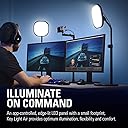
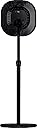
💡 Light up your workspace like a pro — because your stream deserves the spotlight.
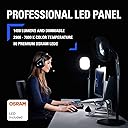
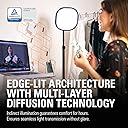
The Elgato Key Light Air is a Wi-Fi enabled, professional-grade desk light offering 1400 lumens of adjustable brightness and a wide 2900-7000K color temperature range. Featuring 80 premium OSRAM LEDs and an edge-lit design, it provides consistent, flicker-free, and comfortable illumination ideal for streaming, broadcasting, and video conferencing. Controlled via a versatile app compatible with Mac, PC, iOS, and Android, it integrates seamlessly with Stream Deck for effortless lighting adjustments. Compact yet powerful, it’s engineered for the modern professional’s workspace.


| ASIN | B082QHRZFW |
| Aspect Ratio | 4:3 |
| Audio Recording | No |
| Best Sellers Rank | #751 in Continuous Output Lighting |
| Brand | Elgato |
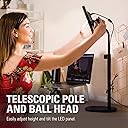
| Built-In Media | Ball Head Mount, Elgato Key Light Air, Power Supply and Quick Start Guide, Telescopic Pole, Weighted Base |
| Compatible Devices | Mac, Windows, iPhone, Android |
| Connectivity Technology | Wi-Fi |
| Customer Reviews | 4.5 out of 5 stars 3,182 Reviews |
| Flash Modes Description | adjustable brightness, adjustable color temperature |
| Global Trade Identification Number | 00840006618638 |
| Hardware Interface | Bluetooth |
| Has Self-Timer | No |
| Item Dimensions L x W x H | 20.5"L x 8.07"W x 9.05"H |
| Item Type Name | Elgato key light air. |
| Item Weight | 1.6 Kilograms |
| Manufacturer | Elgato |
| Manufacturer Part Number | 10LAB9901 |
| Media Type | ProductImage, EnhancedContent |
| Model Name | Elgato Key Light Air |
| Model Number | 10LAB9901 |
| Product Dimensions | 20.5"L x 8.07"W x 9.05"H |
| Screen Size | 75 |
| UPC | 840006618638 |
| Unit Count | 1.0 Count |
| Warranty Description | 2 years |
| Water Resistance Level | Not Water Resistant |
G**L
Small, but a great upgrade
I've been a part time gaming streamer for a year now. I bought the Key Light Air to replace a lower end light by Neewer that I had been using with a soft box to provide some real diffusion to the light because the combination was big and bulky and was just in the way all the time. I use two key lights, one high on the right, and the other low on the left to light both myself and my green screen when I stream. This replaced the left light. Here's what I found: 1) It's TINY. I expected something about the size of my previous light without the shutters and soft box. 2) The edge lighting on the Key Light Air and the multi layer panel provide a consistent, diffused, and bright light that seems to come from everywhere. The diffusion is amazing and far better than a soft box. 3) It's bright. My previous light had 200SMD LEDs and I ran the Key Light Air at the same percentage of brightness. 4) App adjustability was very handy. Instead of "Putting up with it" when my ambient lighting or the shirt I was wearing caused weird lighting issues, I can quickly adjust the light while still watching the camera. 5) Stream Deck compatibility for turning the light on/off, changing brightness and warmth means I can sit straight while making the adjustments, so I don't have to keep moving around because of changes in shadowing. This also makes adjusting it very fast. 6) The weighted desk stand is sturdy, functional, and low. I thought I might have to use the old base I had bought to bring the light down, but it works great. 7) You might as well replace all of your lights with this because you'll end up wishing you bought more at the same time. I get annoyed now having to stand up to work with the old light. While I wasn't excited about spending so much for another light when mine work, I'm very happy with the purchase and plan to buy a second one. I know Elgato isn't the cheapest option out there, but I've been very happy with the quality of their items I've purchased and the value they provide. After buying the other lights, soft boxes, and another stand, I only saved a few dollars over buying the Elgato Key Light Airs up front. I should have spent the additional money up front.
J**D
Beware the set-up issues!
First this is a great product. It is definitely worth the money. The only issue, and this is a big one, is the set-up. I could not get my Elgato key light air's to work with my computer/modem. The solution was to use my iPhone to control the lights. I bought two lights. In my opinion, anything more than two of these lights is overkill as you can use something else (e.g., lamps) to provide additional light if necessary. My Broadcom 80211ac adapter has 2.4 and 5 GHZ options. For whatever reason it will only connect my computer with the 5 GHZ speed though I am able to use either 2.4 or 5 GHZ on my iPhone. So after spending hours with Elgato technical support trying to get the control center app to recognize my light airs I gave up and connected to my iPhone. I set the IPhone at 2.4 GHZ (this is required as it will not work at 5 GHZ), downloaded the control center app onto my phone (using the apple store) and the app finally recognized the air light devices. That said, getting it to recognize two lights required a bit of playing around with the settings on the IPhone. So to help others, here is how I did this. First you turn on the light air, hold the button on the device near the on off switch, pressing it down until the light flashes three times. Then after the light turns on, you turn it off, and then back on. You then go to your iPhone settings and the WIFI section and then add the light air device in the iPhone. You then go to the control center app and it should recognize your new device. To get the second light to work you go through the same process (after turning off the first light). With my iPhone when adding a new device in the WIFI section it still showed the first device name even though it treated this as a new second device. When you go to the control center app wait a little bit and turn on both lights (actual lights) and both lights will show up in the Control app. So the tricky part was it appears you are not adding a new device on the iPhone in the WIFI section when you actually are adding a new device though the description doesn't change (it does not change the first device's name). So then you go to the control app and turn on the two lights and poof there are your lights in the control app. That said, if you switch back to 5 GHZ you will not be able to use your lights. So if you want to use the lights you must have the WIFI setting at 2 GHZ not 5. Elgato was very happy I was able to get this to work so call them as there should be a ticket on how my two lights were set-up. Cheers and good luck!
M**A
Good product left out critical information
All right here's the thing about this light it does what it says as advertised, Keep in mind give a 5 star review, So I'm just mentioning something that gay didn't mention, When you turn the light on it turns on all the way and then shuts off and then slowly turns back on to full brightness I don't know why it does this but I have two of them and they both do the same thing. I'm mentioning this because they didn't and your opinion is broken when you first get it.
A**T
These work really well.
These work really well. I just wish the app was a little better. You can get by with the app but sometimes it would freak out and do weird things. There might have been an update since I bought them, which I didn't do, so maybe they work better than my experience.
K**P
Great key lighting with some minor drawbacks...
Pros: Bright LED Wireless Sturdy build quality App control Adjustable temp Lock multiple units to the same settings or adjust individually using the app. Cons: I find the transition between certain lighting temps to be a bit abrupt. Have had a few random disconnects from one of the two units I purchased. Lack of physical controls - makes these lights useless without the app and WiFi. Footprint of the base is large. Price - there are more competitively priced options. TLDR: Great lights with a nice suite of features. Buy them if they fit into your budget and are looking for these features from a reputable brand.
N**E
I love these lights! No more dark Zoom calls!
My Zoom calls used to be so poorly lit when working from home. Given that I'm in a room that was supposed to be a bedroom that I converted to an office, it has the normal overhead ceiling fan kind of light fixture. That light would blow me out on calls and have lighting in all the wrong places. My face would be too dark, or the sun would come through the window and create all kinds of other issues. I bought two Elgato Key Light Airs and they've been amazing! Easy to put together right of the box. They come with stands that, in the lowest position, can be perfectly positioned on my desk. They can be controlled manually or from software you can download to your computer. You can also control them from the Elgato Control Center app you can get from the Apple or Google app store. I highly recommend the app. In order to control the light(s) this way, you need to pair them with your wifi network which was extremely easy. For controls you have complete control over the warmth and brightness of the lights. Since I have two lights, I chose to link them together and they when I move either slider via the ap, both lights adjust at the same time. I also give Elgato bonus points for the packaging and package design. It is in a very sturdy box so there's no risk of damage in transit and the light and its components are individually wrapped inside. Definitely a first class experience worthy of an unboxing video, but that's not my thing. :)
B**Y
You Get What You Pay For
This light is meant to allow you to replace the big, bulky softbox lights. It's super convenient and doesn't take a lot of real estate. Not to mention, how much of an eyesore those box lights are. I got the Key light and the smaller standing version for my office. My wife is a marriage coach and her office has several video lights, including one huge box light. When she saw my setup, she asked me to get her one as well so we can toss the box light. The quality of this light is very high. It's got weight and feels like it will last. Doesn't look cheap either (like a lot of lighting). The desktop app makes it so easy to turn on the light (or group of lights) with one click. It remembers your color and intensity settings as well. You can adjust right from your desktop with sliders for both color and brightness. I hope this review helps the company and you to make up your mind. If you get this key light, I think you will be impressed. See ya! - B
M**N
Nice light, bad software
Nice light, and it could be a great product if only Elgato employed someone who could write software. I have developed software products for a living for more than 20 years. There is no excuse for delivering such miserable, temperamental software. When you consider the application's triviality, it goes far beyond embarrassing to let something this bad escape the lab, much less ship it as GA for years. The light's only control is the Elgato application, and its use is not optional. With my current, up-to-date, high-end systems and experience in the field, it took me an hour to get their software working on a Mac. It should never be this difficult to turn on a light. The application is buggy and temperamental. It exhibits a different behavior every time I try to use it. Elgaot's documentation is limited, vague, and inconsistent. You will find different instructions depending on what note you read on their website. It seems to have problems with WiFi networks where the same SSID is used for both 2.4 and 5 GHz, which is nearly all modern networks. The random behaviors seem to be driven by which network it finds first. In my case, more often than not, it only wanted to use one of my neighbor's WiFi networks. After a dozen hardware resets, I finally got it to pair and work. Note to Elgato: One competent software engineer could have made this application dance and sing. The opportunity cost easily exceeds whatever money you saved by hiring unqualified help. However, it is not too late; please press the reset button on your software team. While the documentation is worse than the software, an application this simple should not need documentation, so you may fire this team as well. One final clue to get better reviews: Instead of giving the user a list of things to try when it doesn't work, why don't you have your application try the things in the list?
M**A
Excelente, las transmisiones tienen mayor calidad
Buen diseño, se puede ajustar con la aplicación y conseguir el ambiente deseado. Buena compra, sin duda.
O**A
Good lights, but hard to connect
I really like the light that these Key Light Air make (bought a pair). It's flicker-free and able to produce a lot of light, as well as changing the temperature of the light, while still being not so hard on your eyes. Had some trouble connecting them to my wifi through my phone, took a while.
S**H
Used/ old item delivered
Old/used product.
S**L
Elgato Key Light Air: Una Iluminación Profesional y Versátil para mi Oficina y Podcasts
Como creador de contenido y podcaster, la iluminación es un aspecto crucial para mí, y he encontrado en el Elgato Key Light Air la solución perfecta. Poseo dos de estas luces, y juntas forman una pareja inigualable para todas mis necesidades de iluminación. Lo primero que destaca de la Elgato Key Light Air es su impresionante brillo de 1400 lúmenes. Esta capacidad me permite iluminar mi espacio de trabajo de manera eficaz, lo que es esencial tanto para la grabación de vídeos como para las sesiones de podcasting. La posibilidad de atenuar la luz hasta un brillo sutil también me permite crear el ambiente perfecto para cada situación, ya sea una grabación intensa o una videoconferencia más relajada. La gama de temperatura de color, que va de 2900 a 7000 K, es otra característica destacable. Puedo ajustar la luz desde un cálido tono ámbar hasta un fresco azul ártico, lo que me da una gran flexibilidad para jugar con la atmósfera y el tono de mis grabaciones y transmisiones en vivo. Además, la calidad de los 80 LED OSRAM es excepcional, ofreciendo una intensidad constante sin calentarse. Esto es especialmente importante durante largas sesiones de trabajo, ya que me asegura una iluminación fiable y consistente. Pero lo que realmente eleva el Elgato Key Light Air a otro nivel es su conectividad Wi-Fi y la capacidad de controlar la luz a través de la app para Mac, Windows, iPhone y Android. Esta funcionalidad me permite ajustar la luz con facilidad y rapidez, sin tener que interrumpir mi flujo de trabajo o grabación. Finalmente, el diseño de iluminación perimetral garantiza una iluminación indirecta, lo que se traduce en horas de comodidad sin fatiga visual. Esto es crucial para mí, ya que paso muchas horas frente a la pantalla. En conclusión, el Elgato Key Light Air ha sido una inversión valiosa para mi oficina y mis actividades como creador de contenido y podcaster. Su versatilidad, calidad de iluminación y facilidad de uso lo hacen un producto altamente recomendable para profesionales y aficionados por igual. Estoy totalmente satisfecho y encantado con este producto y no dudo en recomendarlo.
L**S
Wszystko super
Bardzo dobre światła
Trustpilot
2 weeks ago
3 days ago