Desert Online General Trading LLC
Dubai, United Arab Emirates
Desert Online General Trading LLC
Dubai, United Arab Emirates


🎮 Stay connected, stay ahead — game on without missing a beat!
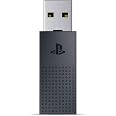
The PlayStation Link USB Adapter enables seamless wireless pairing of PULSE Elite headsets or PULSE Explore earbuds to both your PS5 and PC/Mac simultaneously. Delivering lightning-fast, lossless audio with effortless device switching, it requires no additional software and offers a compact, plug-and-play design for the ultimate gaming convenience.

| Connector Type Used on Cable | Lightning |
| Number of Ports | 1 |
| Compatible Devices | Headphone |
| Specific Uses For Product | PC, Laptop |
| Unit Count | 1.0 Count |
| Number of Items | 1 |
| Item Weight | 0.07 Pounds |
| Package Quantity | 1 |
| Finish Types | Printed |
| Color | Black |
M**T
Ps5 adapter
Perfect
C**T
‘Refurbished’ adapter did not even light up when plugged in to any device.
I have a Pulse 3D Elite PlayStation headset. It came with a USB Link Adapter which after about a year, suddenly stopped connecting to the headset. The headset still connects to other devices, it simply will not connect to my PS5, so I bought a replacement adapter. The replacement is shown in comparison photos with the original USB Link Adapter. The original adapter that came with the headset is pictured on the right in all of the photos. You can see clearly that the ‘refurbished’ adapter does not look as good as the original one, even though my original is over a year old and has been in constant use. In the second photo you can see where the refurbished USB was pried open. Perhaps I’m just putting on a tinfoil hat here, but in the third photo I swear that the font for the text on the back of the USBs don’t even match up properly. The spacing between the letters looks off to me. I do not recommend this product, you’ll likely have better luck on Playstation Direct. Even at the cost of a few extra dollars it is worth it to ensure you are getting a properly working product.
L**Z
EL PRODUCTO SI FUNCIONA!!!!!!!!
el PlayStation Link USB Adapter si funciona solo que hay mucha desinformacion con respecto al usb, puedes conectar tanto el PULSE ELITE como el PULSE EXPLORE , por ejemplo tengo el pulse explore y compro este usb para no estar sacando el usb de la ps5 a la pc o otros y lo primero que tienes que hacer para registar el nuevo usb es conectas el usb a lo que quieres poner tanto pc como ps5 , luego con los audifonos puestos en su estuche preciones dentro de estuche el boton de link por 8 segundos hasta que parpadeando y luego precionas el PlayStation Link USB Adapter "OJO" tienes que precionar el usb aunque no veas que tenga un boton pero si tiene interno ( eso no lo sabia hasta que me di cuenta) y luego veras que se sincronizan y listo ya estara registrado con el nuevo usb, lo mismo es con el PULSE ELITE
R**N
Ps5 Pulse Elite Headset USB
Servicio exelente solo que no me funciono, tuve que devolverlo.
D**S
For Pulse ELITE and Explore only (Not compatible with base Pulse headset)
**READ BEFORE BUYING: This product is NOT compatible with the base Pulse 3D headset, only Pulse Elite and Explore.** Excellent replacement in case the adapter that initially came with your Pulse Elite headset or Pulse Explore airbuds goes belly-up. Just follow the pairing instructions for both the adapter and corresponding device.
W**O
Do not keep plugged in. Adhesive melted twice within a months time.
The media could not be loaded. Not even a month in, the metal came off of the single, from which I assume to be from heat coming off of the PlayStation. I do not recommend Keeping it plugged into the PlayStation with poor ventilation at all times. The heat will melt the adhesive, causing the dongle to not function properly.This is my second dogle and I'm about to purchase a new one
M**R
How to connect to Elite Pulse Headphones.
For me, if you lost the original usb adapter here’s how to connect these to the pulse elite headphones. First, plug the adapter to the usb port in your computer. If you have a mac, you have to buy a usb c to adapter piece. Make sure the sony adapter is pressed down into the usb c adapter. Hold the pulse connection button on the headphones down for 8 sec until it flashes blue then stops flashing. the sony usb should not be flashing that’s how you know it’s connected. plug the sony usb into the ps5. hold down the button on headphones again now it will connect to ps5
A**X
Alr product
It’s fits goodJust on edge it’s going to break
Trustpilot
2 days ago
3 days ago
3 weeks ago
5 days ago